The plugin ZIP from your Customer Success Manager.
1
Install the plugin
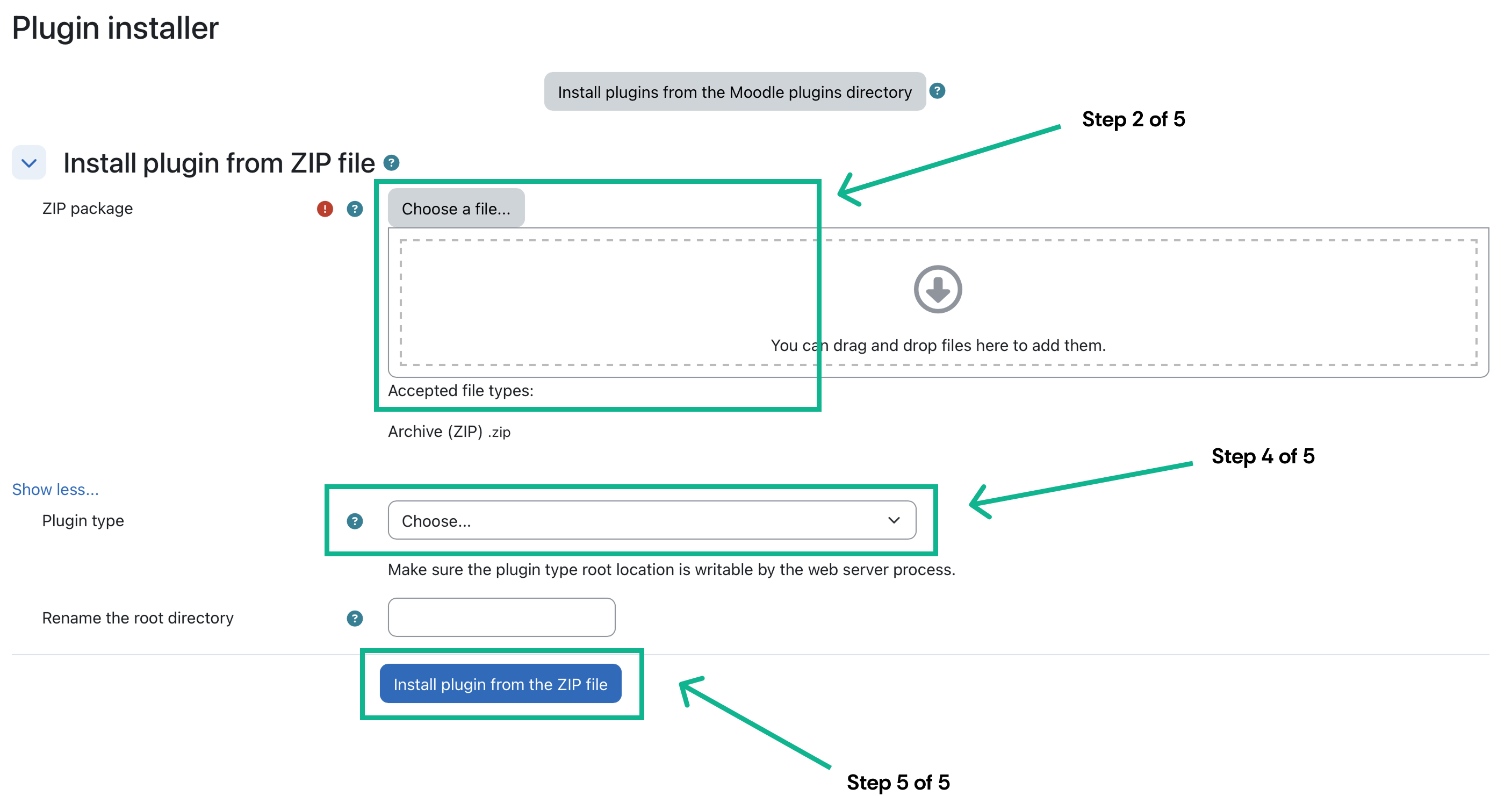
Open https://<your-moodle-instance>/admin/tool/installaddon/index.php.Select Choose a file… and upload the ZIP from your Customer Success Manager. Select Show more… and set Plugin type to Local plugin (local).
Upload the plugin ZIP and select Local plugin.
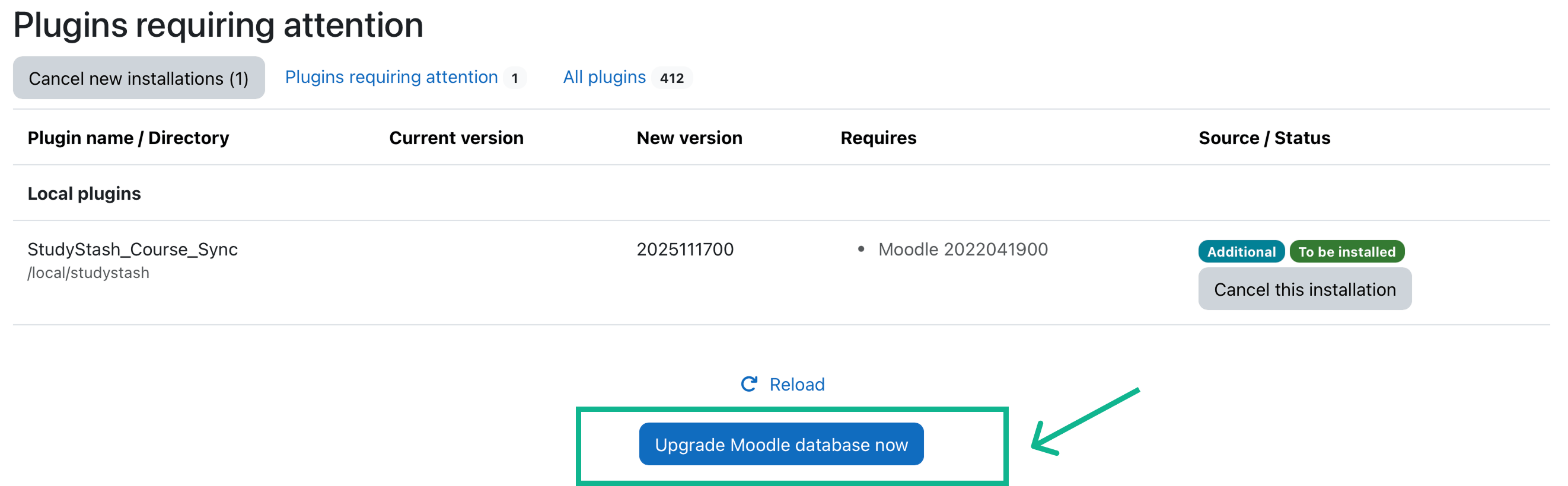
Select Install plugin from the ZIP file. Select Continue after validation, then Continue after the server checks.At the plugins check, select Upgrade Moodle database now.
Complete the plugin installation with the Moodle database upgrade.
If an Upgrading to new version message appears, select Continue.
2
Configure the plugin
Use these settings:
Setting
Value
Required?
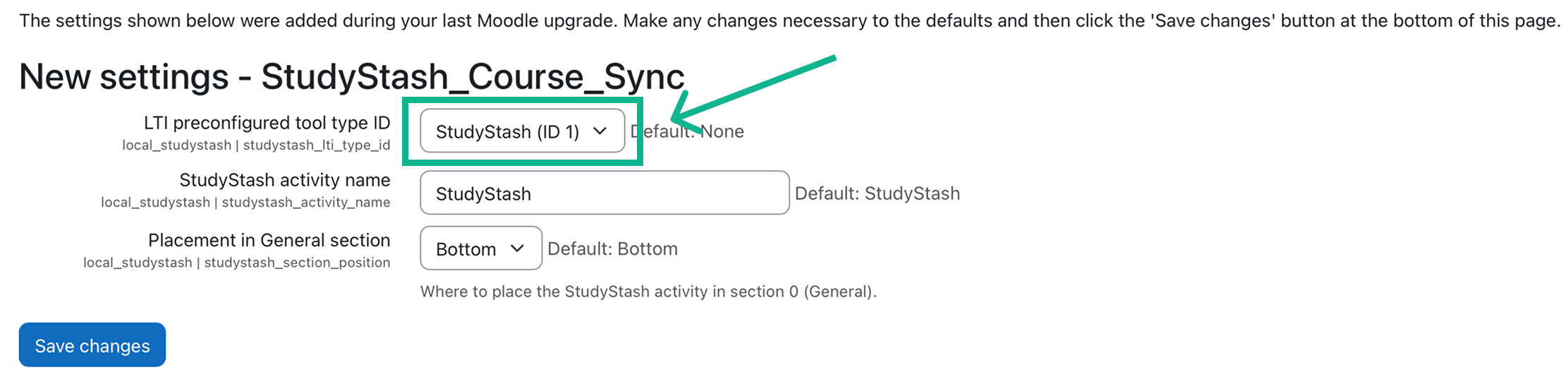
LTI preconfigured tool type ID
Select the correct StudyStash LTI Activity Module
Yes
StudyStash activity name
StudyStash
No
Placement in General section
Bottom
No
Select the StudyStash tool and choose the activity settings.
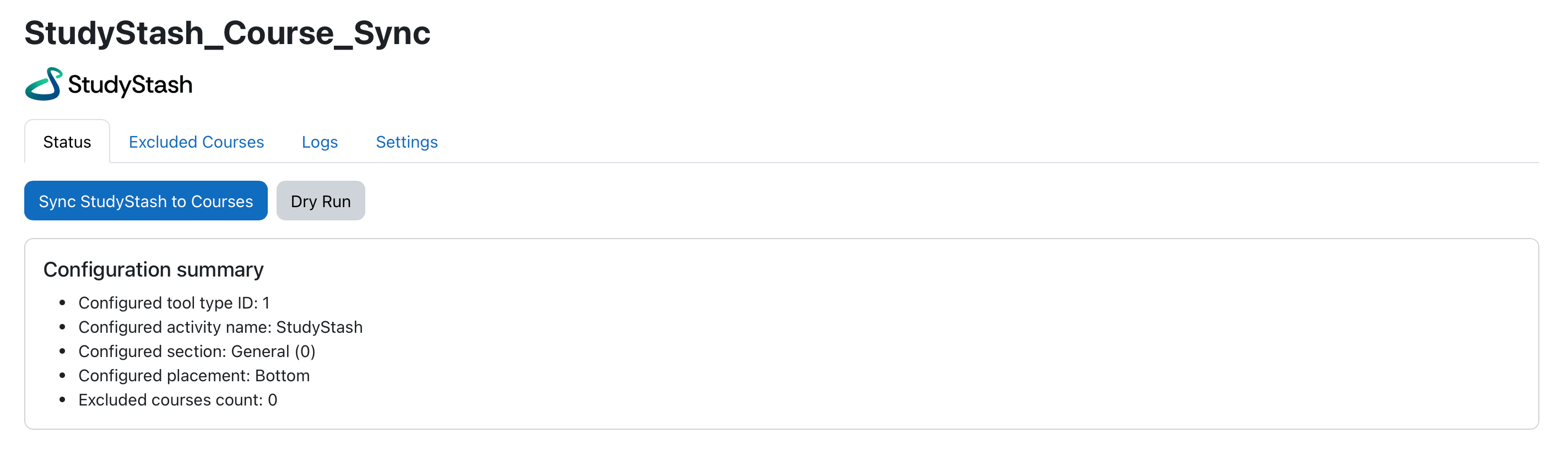
Select Save changes, then open https://<your-moodle-instance>/local/studystash/index.php.
Open the rollout plugin to manage courses and sync tasks.
3
Choose courses to exclude
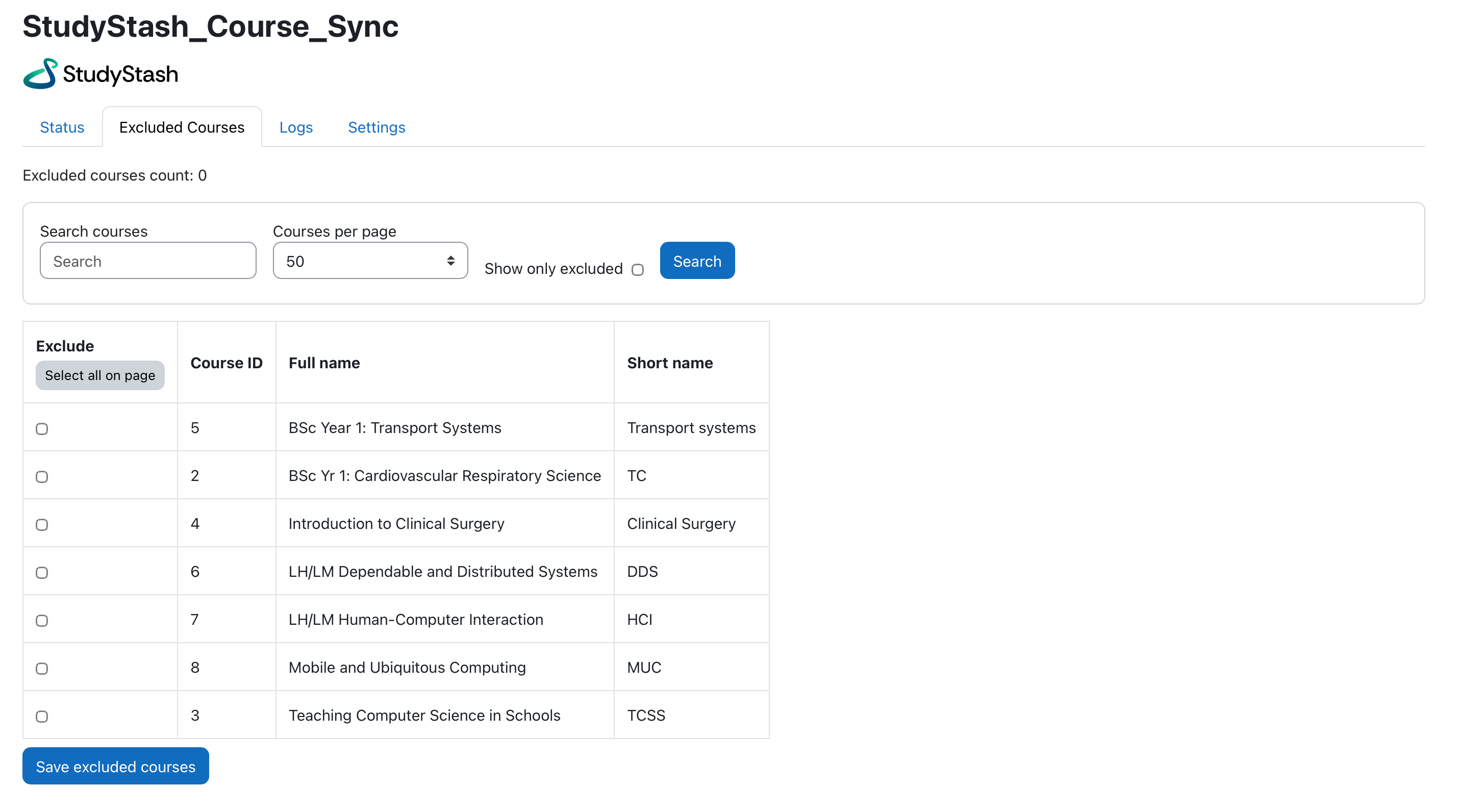
Open Excluded Courses. Use the filters to find any courses that should not receive the StudyStash activity, then select their checkboxes.
Select courses to leave out of the rollout.
Select Save excluded courses, then return to Status.
4
Preview the sync
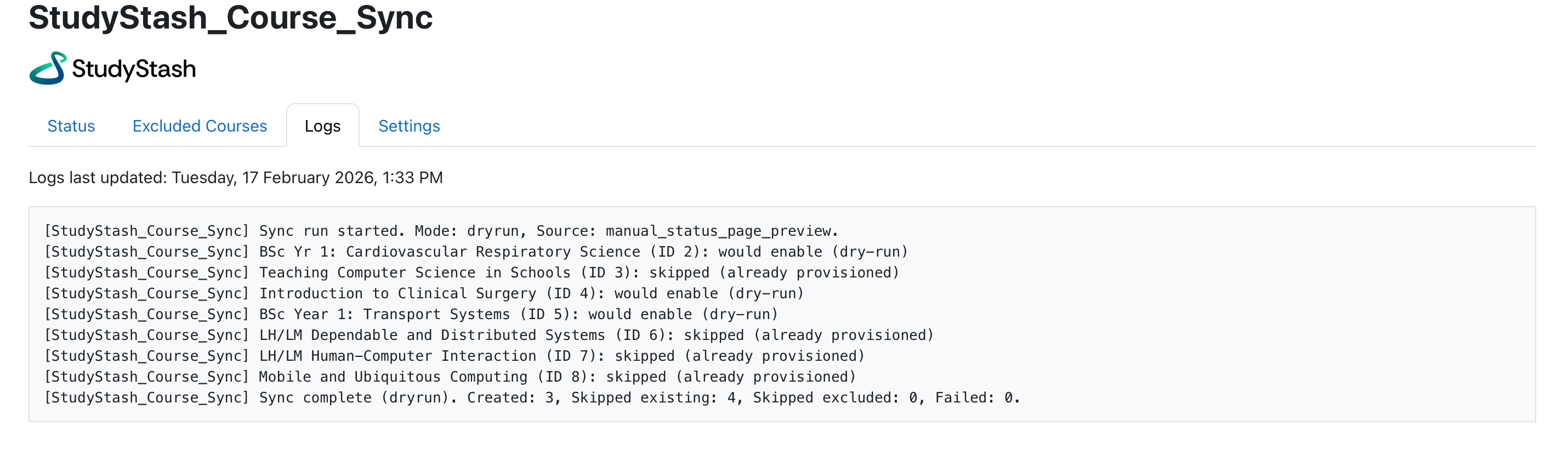
On Status, select Dry Run and wait for the task to finish. Larger course lists may take longer.
Run a preview before changing course activities.
Open Logs and check the planned behaviour for each course before continuing.
5
Sync the courses
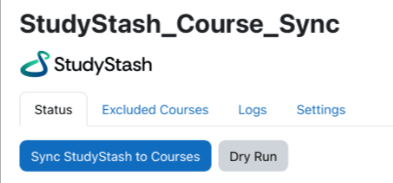
When the preview is correct, return to Status and select Sync StudyStash to Courses to apply the changes.
Run the sync after checking the dry-run logs.
{"docsConfig":{"theme":"mint","$schema":"https://mintlify.com/docs.json","name":"StudyStash Help Centre","description":"Guides and support for StudyStash students, instructors and administrators.","colors":{"primary":"#004C89","light":"#93BCE8","dark":"#004C89"},"logo":{"light":"https://mintcdn.com/studystash-help/UbXlxW0z5agaJ_Cy/logo/studystash-logo-colour-rgb.png?fit=max\u0026auto=format\u0026n=UbXlxW0z5agaJ_Cy\u0026q=85\u0026s=b42380e4f9b27366a5d79712531f7301","dark":"https://mintcdn.com/studystash-help/UbXlxW0z5agaJ_Cy/logo/studystash-logo-white-rgb.png?fit=max\u0026auto=format\u0026n=UbXlxW0z5agaJ_Cy\u0026q=85\u0026s=3ab46876df891935607077352b8c8f23","href":"/"},"favicon":"https://mintcdn.com/studystash-help/UbXlxW0z5agaJ_Cy/images/android-chrome-512x512.png?fit=max\u0026auto=format\u0026n=UbXlxW0z5agaJ_Cy\u0026q=85\u0026s=5bbbe16cd63c9616be8af0a2be969361","appearance":{"default":"light","strict":true},"background":{"color":{"light":"#FFFFFF","dark":"#0C1624"}},"navbar":{"links":[{"href":"/support","label":"Support"}],"primary":{"type":"button","label":"Open StudyStash","href":"https://studystash.com"}},"footer":{"links":[{"header":"StudyStash","items":[{"label":"Website","href":"https://studystash.com"},{"label":"Trust centre","href":"https://trust.studystash.com"},{"label":"Status","href":"https://status.studystash.com"},{"label":"Support requests","href":"https://internal.support.studystash.com/servicedesk/customer/portal/34"}]}]},"search":{"prompt":"Search help guides…"},"fonts":{"family":"Rethink Sans"},"styling":{"eyebrows":"breadcrumbs","latex":false},"contextual":{"options":[],"display":"header"},"navigation":{"pages":[]}},"deployment":{"deploymentMetadataValue":{"subdomain":"studystash-help","hasAudioNarration":false,"actualSubdomain":"studystash-help","customDomains":["help2.studystash.com"],"gitSource":{"type":"github","owner":"studystashapp","repo":"help-center","deployBranch":"main","contentDirectory":"","isPrivate":true,"mountPath":"","label":""},"chroma":{"latestBuiltDeploymentHistoryId":"6aec2e836ea3dafcfecbbbf9","collectionId":"b81fcb05-5829-47d9-8c78-f860a7ddfa21","liveDeploymentHistoryId":"6aec2e836ea3dafcfecbbbf9","schemaVersion":"v3"},"feedback":{"thumbs":false},"entitlements":{},"buildId":"6aec2e836ea3dafcfecbbbf9","clientVersion":"0.0.4067","searchFilterCounts":[{"language":"default","tag":"Administrators","count":25},{"language":"default","tag":"Students","count":14},{"language":"default","tag":"Instructors","count":12},{"language":"default","tag":"Get started","count":11},{"language":"default","tag":"Integrations","count":11},{"language":"default","tag":"Start here","count":8},{"language":"default","tag":"LMS integrations","count":7},{"language":"default","tag":"Your account","count":6},{"language":"default","tag":"Manage students and staff","count":5},{"language":"default","tag":"Pilots and evaluation","count":4}]},"assistantConfig":{"enableAskAiButton":false,"enableStarterQuestions":false,"enableContextualStarterQuestions":false,"enableAskAiSearchBar":true},"basePath":"","hasChatPermissions":false,"hasWebMcpPermissions":false,"toggles":[{"name":"kill-isr","enabled":true,"variant":{"name":"disabled","enabled":false,"feature_enabled":true},"impressionData":false},{"name":"agent-mintlify-slack","enabled":true,"variant":{"name":"disabled","enabled":false,"feature_enabled":true},"impressionData":false},{"name":"agent-integrations-settings","enabled":true,"variant":{"name":"disabled","enabled":false,"feature_enabled":true},"impressionData":false},{"name":"rbac-expansion","enabled":true,"variant":{"name":"disabled","enabled":false,"feature_enabled":true},"impressionData":false},{"name":"automations-pr-grouping","enabled":true,"variant":{"name":"disabled","enabled":false,"feature_enabled":true},"impressionData":false},{"name":"custom-prefix","enabled":true,"variant":{"name":"disabled","enabled":false,"feature_enabled":true},"impressionData":false},{"name":"analytics-v7","enabled":true,"variant":{"name":"disabled","enabled":false,"feature_enabled":true},"impressionData":false},{"name":"user-flows-analytics","enabled":true,"variant":{"name":"disabled","enabled":false,"feature_enabled":true},"impressionData":false},{"name":"no-publish-flow","enabled":true,"variant":{"name":"disabled","enabled":false,"feature_enabled":true},"impressionData":false},{"name":"workos-onboarding","enabled":true,"variant":{"name":"disabled","enabled":false,"feature_enabled":true},"impressionData":false},{"name":"llms-txt-v2","enabled":true,"variant":{"name":"disabled","enabled":false,"feature_enabled":true},"impressionData":false},{"name":"snapshot-serving-live","enabled":true,"variant":{"name":"disabled","enabled":false,"feature_enabled":true},"impressionData":false},{"name":"stripTemperatureMiddleware","enabled":true,"variant":{"name":"disabled","enabled":false,"feature_enabled":true},"impressionData":false},{"name":"support-platform-pylon-zendesk","enabled":true,"variant":{"name":"disabled","enabled":false,"feature_enabled":true},"impressionData":false},{"name":"snapshot-serving","enabled":true,"variant":{"name":"disabled","enabled":false,"feature_enabled":true},"impressionData":false},{"name":"instant-rollback","enabled":true,"variant":{"name":"disabled","enabled":false,"feature_enabled":true},"impressionData":false},{"name":"granular-notifications-server","enabled":true,"variant":{"name":"disabled","enabled":false,"feature_enabled":true},"impressionData":false},{"name":"granular-notifications","enabled":true,"variant":{"name":"disabled","enabled":false,"feature_enabled":true},"impressionData":false},{"name":"automations-fable","enabled":true,"variant":{"name":"disabled","enabled":false,"feature_enabled":true},"impressionData":false},{"name":"fixed-ai-action-pricing","enabled":true,"variant":{"name":"disabled","enabled":false,"feature_enabled":true},"impressionData":false},{"name":"automation-resolve-merge-conflict","enabled":true,"variant":{"name":"disabled","enabled":false,"feature_enabled":true},"impressionData":false},{"name":"scoped-publishing","enabled":true,"variant":{"name":"disabled","enabled":false,"feature_enabled":true},"impressionData":false},{"name":"mintql","enabled":true,"variant":{"name":"disabled","enabled":false,"feature_enabled":true},"impressionData":false},{"name":"page-level-analytics","enabled":true,"variant":{"name":"disabled","enabled":false,"feature_enabled":true},"impressionData":false},{"name":"editor-version-history-v2","enabled":true,"variant":{"name":"disabled","enabled":false,"feature_enabled":true},"impressionData":false},{"name":"billing-page-v2","enabled":true,"variant":{"name":"disabled","enabled":false,"feature_enabled":true},"impressionData":false},{"name":"full-page-search","enabled":true,"variant":{"name":"disabled","enabled":false,"feature_enabled":true},"impressionData":false},{"name":"workspace-projects","enabled":true,"variant":{"name":"disabled","enabled":false,"feature_enabled":true},"impressionData":false},{"name":"assistant-v5","enabled":true,"variant":{"name":"disabled","enabled":false,"feature_enabled":true},"impressionData":false},{"name":"fork-pr-previews","enabled":true,"variant":{"name":"disabled","enabled":false,"feature_enabled":true},"impressionData":false},{"name":"revalidation-jwt","enabled":true,"variant":{"name":"disabled","enabled":false,"feature_enabled":true},"impressionData":false},{"name":"vite-origin","enabled":true,"variant":{"name":"disabled","enabled":false,"feature_enabled":true},"impressionData":false},{"name":"workos-sso-scim","enabled":true,"variant":{"name":"disabled","enabled":false,"feature_enabled":true},"impressionData":false},{"name":"hobby-abuse-scan","enabled":true,"variant":{"name":"disabled","enabled":false,"feature_enabled":true},"impressionData":false},{"name":"dashboard-inbox","enabled":true,"variant":{"name":"disabled","enabled":false,"feature_enabled":true},"impressionData":false},{"name":"workos-signup","enabled":true,"variant":{"name":"disabled","enabled":false,"feature_enabled":true},"impressionData":false},{"name":"turbopuffer-dual-write","enabled":true,"variant":{"name":"disabled","enabled":false,"feature_enabled":true},"impressionData":false},{"name":"workos-enabled","enabled":true,"variant":{"name":"disabled","enabled":false,"feature_enabled":true},"impressionData":false},{"name":"approve-review-flow","enabled":true,"variant":{"name":"disabled","enabled":false,"feature_enabled":true},"impressionData":false},{"name":"sso-setup-deadline-banner","enabled":true,"variant":{"name":"disabled","enabled":false,"feature_enabled":true},"impressionData":false},{"name":"turbopuffer-serve","enabled":true,"variant":{"name":"disabled","enabled":false,"feature_enabled":true},"impressionData":false},{"name":"live-agents","enabled":true,"variant":{"name":"disabled","enabled":false,"feature_enabled":true},"impressionData":false}],"privacy":{"consentBanner":{"enabled":true}},"googleFontsInlined":true},"customCss":[{"filePath":"custom.css","content":":root,.ss-help-layout{--ss-brand-blue: #004c89;--ss-ink: #132b43;--ss-muted: #536578;--ss-line: #d9e2eb;--ss-surface: #f4f7fa;--ss-canvas: #ffffff;--ss-paper: #ffffff;--ss-accent: var(--ss-brand-blue);--ss-blue: var(--ss-brand-blue);--ss-tint: #e4edf3;--ss-on-accent: #ffffff}.dark{--ss-ink: #edf3fa;--ss-muted: #b6c5d6;--ss-line: #2c4058;--ss-surface: #1b2d43;--ss-canvas: #0c1624;--ss-paper: #142438;--ss-accent: #93bce8;--ss-blue: #93bce8;--ss-tint: #1d3550;--ss-on-accent: #0c1624}body:has(.ss-help-layout) #content-area{padding:0}.ss-help-layout{min-height:100vh;display:flex;flex-direction:column;overflow:clip;color:var(--ss-ink);background:var(--ss-canvas);font-family:\"Rethink Sans\", sans-serif;font-size:15px;line-height:1.55}.ss-help-layout *{box-sizing:border-box}.ss-help-layout :is(h1,h2,h3,p,ul){margin:0}.ss-help-layout a{color:inherit;text-decoration:none}.ss-help-layout a:hover{color:var(--ss-accent)}.ss-help-layout :is(a,button,input):focus-visible{outline:3px solid var(--ss-accent);outline-offset:5px}.ss-help-layout h1{font-size:48px;line-height:1.12;letter-spacing:-1.7px;font-weight:600;color:var(--ss-ink)}.ss-help-layout h2{font-size:25px;line-height:1.25;letter-spacing:-.65px;font-weight:600}.ss-help-header{border-bottom:1px solid var(--ss-line)}.ss-header-inner,.ss-footer-inner{max-width:1220px;padding:23px 40px;margin:0 auto;display:flex;align-items:center;justify-content:space-between;gap:24px}.ss-help-brand{display:flex;align-items:center;gap:18px;flex-shrink:0}.ss-help-brand img{display:block;width:153px;height:auto;margin:0}.ss-help-brand .ss-help-logo-dark{display:none}.dark .ss-help-brand .ss-help-logo-light{display:none}.dark .ss-help-brand .ss-help-logo-dark{display:block}.ss-help-brand>span{padding-left:18px;border-left:1px solid var(--ss-line);color:var(--ss-muted);font-size:13px}.ss-help-header-links{display:flex;align-items:center;gap:26px;font-size:13px;font-weight:500}.ss-help-open{display:inline-flex;align-items:center;justify-content:center;gap:10px;min-height:44px;border:1px solid var(--ss-brand-blue);padding:10px 16px;border-radius:8px;font-weight:600;white-space:nowrap}.ss-help-layout a.ss-help-open{background:var(--ss-brand-blue);color:#fff;box-shadow:0 1px 2px #132b4314;transition:background-color .15s ease}.ss-help-layout a.ss-help-open:hover{background:#003d6e;border-color:#003d6e;color:#fff}.ss-help-open svg{flex:0 0 auto}.ss-help-content{width:100%;max-width:1140px;flex:1;isolation:isolate;margin:0 auto;padding:0 40px}.ss-eyebrow{color:var(--ss-accent);font-size:12px;font-weight:600;letter-spacing:.03em}.ss-home-hero{display:grid;grid-template-columns:1fr 1.1fr;align-items:center;gap:40px;padding:18px 0;margin:42px 0 44px}.ss-home-hero h1{font-size:43px;letter-spacing:-1.5px}.ss-home-hero .ss-search{max-width:610px;margin:0 auto;text-align:left}.ss-search{position:relative;width:100%;text-align:left}.ss-search-launcher{display:flex;align-items:center;gap:12px;width:100%;min-height:58px;padding:8px 9px 8px 18px;border:1px solid var(--ss-line);border-radius:9px;background:var(--ss-paper);box-shadow:0 3px 8px #16353106;color:var(--ss-ink);font:inherit;text-align:left;cursor:pointer}.ss-search-launcher:hover{border-color:var(--ss-accent)}.ss-search-launcher:focus-visible{outline:2px solid var(--ss-accent);outline-offset:3px}.ss-search-launcher>svg{width:20px;height:20px;flex-shrink:0;color:var(--ss-accent)}.ss-search-placeholder{flex:1;min-width:0;color:var(--ss-muted);font-size:15px}.ss-search-action{border-radius:6px;padding:11px 18px;background:var(--ss-accent);color:var(--ss-on-accent);font-size:13px;font-weight:500}.ss-section-heading{display:flex;align-items:flex-end;justify-content:space-between;gap:20px;margin-bottom:22px}.ss-section-heading p{color:var(--ss-muted);font-size:14px;margin-top:7px}.ss-help-layout a.ss-help-link{display:inline-flex;align-items:center;gap:12px;color:var(--ss-accent);font-size:13px;font-weight:500}.ss-audience-grid{display:grid;grid-template-columns:repeat(3,minmax(0,1fr));gap:24px}.ss-audience-card{display:block;min-width:0;overflow:hidden;border:1px solid var(--ss-line);border-radius:10px}.ss-audience-card:hover{border-color:var(--ss-accent)}.ss-audience-copy{padding:24px}.ss-audience-copy h3{font-size:25px;font-weight:600;line-height:1.2;letter-spacing:-.7px}.ss-audience-copy p{font-size:14px;line-height:1.6;color:var(--ss-muted);margin:10px 0 0;min-height:44px}.ss-help-support{display:flex;align-items:center;gap:20px;padding:29px 32px;margin:30px 0 44px;border-radius:12px;background:var(--ss-tint)}.ss-help-support h2{font-size:23px;letter-spacing:-.5px;margin-bottom:6px}.ss-help-support p{color:var(--ss-muted);font-size:14px}.ss-help-button{display:inline-flex;align-items:center;justify-content:center;gap:22px;border:1px solid var(--ss-accent);padding:12px 18px;border-radius:7px;font-size:13px;font-weight:500;white-space:nowrap;min-height:44px}.ss-help-support .ss-help-button{margin-left:auto;background:var(--ss-accent);color:var(--ss-on-accent)}.ss-help-layout .ss-help-button:hover{color:var(--ss-accent);background:var(--ss-paper)}.ss-help-footer{border-top:1px solid var(--ss-line);color:var(--ss-muted);font-size:12px}.ss-footer-inner{padding-top:25px;padding-bottom:27px;align-items:flex-start}.ss-footer-inner>a{flex-shrink:0;font-weight:500;color:var(--ss-ink)}.ss-help-footer nav{display:flex;justify-content:flex-end;flex-wrap:wrap;gap:10px 22px}.ss-help-breadcrumb{display:flex;flex-wrap:wrap;align-items:center;gap:11px;margin:25px 0 19px;color:var(--ss-muted);font-size:13px}.ss-role-hero{position:relative;padding:44px 0 38px}.ss-role-hero-copy{max-width:620px;margin:0 auto;text-align:center}.ss-role-hero h1{color:white;font-size:43px;margin:0}.ss-role-hero h1+p{color:#e4edf3;margin-top:13px}.ss-role-hero .ss-search{margin-top:25px}.ss-role-start{position:relative;display:flex;align-items:center;justify-content:space-between;gap:24px;padding:26px 28px;margin:0 0 26px;border:1px solid var(--ss-line);border-radius:10px;background:var(--ss-paper);box-shadow:0 3px 12px #132b4308}.ss-role-start h2{font-size:23px;margin:6px 0}.ss-role-start p:not(.ss-eyebrow){font-size:14px;color:var(--ss-muted)}.ss-topic-nav{display:flex;flex-wrap:wrap;gap:8px;padding:0 0 25px}.ss-topic-nav a{display:block;padding:7px 13px;border:1px solid var(--ss-line);border-radius:6px;color:var(--ss-muted);font-size:13px}.ss-topic-nav a:hover{background:var(--ss-tint)}.ss-role-sections{display:grid;grid-template-columns:repeat(2,minmax(0,1fr));gap:24px;margin:0 0 48px}.ss-role-section{border:1px solid var(--ss-line);border-radius:10px;background:var(--ss-paper);padding:25px 26px 12px}.ss-role-section h2{font-size:21px;font-weight:600;margin-bottom:20px;letter-spacing:-.45px;scroll-margin-top:25px}.ss-role-section ul{list-style:none;padding:0}.ss-role-section li{margin:0;padding:0}.ss-role-section li a{display:flex;align-items:center;justify-content:space-between;gap:20px;padding:14px 0;border-top:1px solid var(--ss-line);font-size:14px;min-height:49px}.ss-role-section li a span:last-child{flex-shrink:0;color:var(--ss-accent)}.ss-role-section:last-child:nth-child(odd){grid-column:1 / -1}.ss-role-section:last-child:nth-child(odd) ul{display:grid;grid-template-columns:repeat(2,minmax(0,1fr));column-gap:36px}@media (max-width: 1000px){.ss-header-inner,.ss-footer-inner,.ss-help-content{padding-left:28px;padding-right:28px}.ss-audience-grid{gap:16px}.ss-audience-copy{padding:20px 18px}.ss-audience-copy h3{font-size:23px}.ss-role-hero h1{font-size:36px}}@media (max-width: 760px){.ss-help-brand>span{display:none}.ss-home-hero{grid-template-columns:1fr;gap:22px}.ss-home-hero h1{font-size:36px}.ss-audience-grid{grid-template-columns:1fr;gap:22px}.ss-audience-card{display:grid;grid-template-columns:124px minmax(0,1fr);align-items:center}.ss-audience-copy p{min-height:0}.ss-role-hero{padding:32px 0}.ss-role-sections{gap:18px}.ss-role-section{padding:22px 20px 9px}.ss-footer-inner{flex-direction:column;gap:16px}.ss-help-footer nav{justify-content:flex-start}}@media (max-width: 520px){.ss-header-inner{padding:17px 20px;gap:14px}.ss-help-brand img{width:139px}.ss-help-header-links{font-size:12px;gap:12px}.ss-header-inner{flex-wrap:wrap}.ss-help-header-links{width:100%;justify-content:space-between}.ss-help-content{padding:0 20px}.ss-home-hero{padding:0;margin:32px 0;gap:22px}.ss-home-hero h1{font-size:32px;letter-spacing:-1px;margin-top:9px}.ss-search-launcher{padding:6px 7px 6px 11px;gap:9px}.ss-search-placeholder{font-size:16px}.ss-search-action{padding:10px 12px}.ss-section-heading{align-items:flex-start;flex-direction:column;gap:13px}.ss-section-heading h2{font-size:25px}.ss-section-heading p{font-size:13px}.ss-audience-card{grid-template-columns:88px minmax(0,1fr)}.ss-audience-copy{padding:20px 18px}.ss-audience-copy h3{font-size:21px}.ss-audience-copy p{font-size:13px;margin-top:7px;margin-bottom:0}.ss-help-support{flex-direction:column;align-items:flex-start;padding:24px;margin:20px 0 30px;gap:18px}.ss-help-support h2{font-size:23px}.ss-help-support .ss-help-button{margin-left:0}.ss-footer-inner{padding:24px 20px}.ss-help-footer nav{gap:13px 19px}.ss-help-breadcrumb{font-size:12px;margin:22px 0 17px}.ss-role-hero h1{font-size:32px;letter-spacing:-1px}.ss-role-hero h1+p{font-size:14px}.ss-role-start{flex-direction:column;align-items:flex-start;gap:17px;padding:24px 20px}.ss-role-sections,.ss-role-section:last-child:nth-child(odd) ul{grid-template-columns:1fr}.ss-role-section{padding:22px 20px 8px}.ss-topic-nav{gap:7px;padding:18px 0 22px}.ss-topic-nav a{font-size:12px}}.ss-audience-nav{display:flex;align-items:center;gap:26px;max-width:1220px;margin:0 auto;padding:0 40px 14px;font-size:13px}.ss-audience-nav a{padding:6px 0;color:var(--ss-muted);border-bottom:2px solid transparent}.ss-audience-nav a[aria-current=\"page\"]{color:var(--ss-accent);border-color:var(--ss-accent);font-weight:600}.ss-audience-copy h3{display:flex;align-items:center;justify-content:space-between;gap:12px}.ss-audience-copy h3>span{color:var(--ss-accent);font-size:23px;font-weight:400}#content [data-component-part=\"step-indicator\"]{background:var(--ss-tint);color:var(--ss-accent);font-size:13px}#content [data-component-part=\"step-title\"]{font-size:19px;line-height:1.4;font-weight:600;color:var(--ss-ink);letter-spacing:-.25px}#content [data-component-part=\"step-line\"]{background:var(--ss-line)}#header .breadcrumb-list{flex-wrap:wrap}#header .breadcrumb-list a{color:var(--ss-accent)}@media (min-width: 1001px){.ss-help-header{position:relative}.ss-audience-nav{position:absolute;top:23px;left:50%;transform:translateX(-50%);padding:6px 0;gap:24px}}.ss-product-visual{display:flex;align-items:center;justify-content:center;height:170px;overflow:hidden;padding:24px;border-radius:9px 9px 0 0;background:var(--ss-surface)}.ss-product-window{display:block;flex-shrink:0;width:100%;max-width:340px;height:auto;overflow:hidden;border-radius:8px;box-shadow:0 2px 10px #16353108}.ss-product-students .ss-product-window{width:158px;height:124px;background:white}.ss-product-educators .ss-product-window{background:white}.ss-product-administrators .ss-product-window{max-width:196px}.ss-role-hero>.ss-product-visual{height:100%;min-height:260px;border-radius:9px}.ss-role-hero .ss-product-students .ss-product-window{width:230px;height:180px}.ss-role-hero .ss-product-administrators .ss-product-window{max-width:330px}@media (max-width: 1000px){.ss-audience-nav{padding-left:28px;padding-right:28px}.ss-home-hero{gap:24px}.ss-home-hero h1{font-size:36px}.ss-product-visual{height:162px;padding:18px}.ss-audience-copy p{min-height:44px}}@media (max-width: 760px){.ss-audience-card .ss-product-visual{height:100%;min-height:124px;padding:14px;border-radius:0}.ss-audience-card .ss-product-window{max-width:100%;height:auto}.ss-audience-copy p{min-height:0}.ss-role-hero>.ss-product-visual{display:none}}@media (max-width: 520px){.ss-header-inner{padding-bottom:10px}.ss-audience-nav{padding:0 20px 9px;gap:0;justify-content:space-between;font-size:12px}.ss-audience-nav a{min-height:44px;display:flex;align-items:center}.ss-home-hero{padding:0;gap:22px}.ss-home-hero h1{font-size:32px}.ss-audience-card .ss-product-visual{min-height:118px;padding:10px}}html:has(.ss-help-layout),body:has(.ss-help-layout){color-scheme:light;background:#ffffff}.ss-help-layout .ss-help-brand .ss-help-logo-light{display:block}.ss-help-layout .ss-help-brand .ss-help-logo-dark{display:none}.ss-help-layout-home .ss-home-hero{position:relative;display:flex;flex-direction:column;gap:25px;padding:44px 0 38px;margin:0;text-align:center}.ss-help-layout-home .ss-home-hero::before,.ss-help-layout-audience .ss-role-hero::before{content:'';position:absolute;z-index:-1;top:0;bottom:-135px;left:50%;width:100vw;transform:translateX(-50%);background:var(--ss-brand-blue)}.ss-help-layout-audience .ss-role-hero::before{bottom:-65px}.ss-help-layout-home .ss-home-hero h1{color:white}.ss-help-layout-home .ss-home-hero .ss-search{max-width:620px}.ss-help-layout-home .ss-audiences{position:relative;padding-bottom:52px}.ss-help-layout-home .ss-directory-heading{color:white;font-size:17px;font-weight:500;letter-spacing:-.25px;margin:0 0 20px}.ss-help-layout-home .ss-audience-card{display:block;background:var(--ss-paper);border-color:var(--ss-line);box-shadow:0 3px 12px #132b4308}.ss-help-layout-home .ss-audience-card:hover{border-color:var(--ss-accent)}.ss-help-layout-home .ss-audience-card .ss-product-visual{height:270px;min-height:0;padding:18px;border-radius:9px 9px 0 0}.ss-help-layout-home .ss-audience-card .ss-product-window{width:100%;max-width:min(300px, 100%);height:auto}.ss-help-layout-home .ss-product-students .ss-product-window{width:234px;aspect-ratio:1}.ss-help-layout-home .ss-product-administrators .ss-product-window{width:300px;max-width:100%;box-shadow:none;border-radius:0}.ss-help-layout-home .ss-audience-copy{padding:22px 24px}.ss-help-layout .ss-footer-inner{padding-top:25px;padding-bottom:25px}#footer.advanced-footer{width:100%;border-color:var(--ss-line);background:var(--ss-canvas);color:var(--ss-muted)}#footer.advanced-footer>div{max-width:1220px;padding:28px 40px;gap:16px}#footer.advanced-footer>div>div:first-child{align-items:center;gap:24px}#footer.advanced-footer>div>div:first-child>div{min-width:0;flex:0 1 auto}#footer.advanced-footer>div>div:first-child>div:last-child{display:block}#footer.advanced-footer .nav-logo{width:153px;max-width:100%;height:auto}#footer.advanced-footer>div>div:first-child div:has(>a[href^=\"https://\"]){display:flex;flex-direction:row;flex-wrap:wrap;justify-content:flex-end;gap:8px 24px}#footer.advanced-footer>div>div:first-child a[href^=\"https://\"]{display:inline-flex;align-items:center;min-height:32px;max-width:none;white-space:nowrap;color:var(--ss-muted);font-size:13px}#footer.advanced-footer>div>div:nth-child(2){background:var(--ss-line)}#footer.advanced-footer>div>div:last-child{gap:20px}#footer.advanced-footer>div>div:last-child a{color:var(--ss-muted);font-size:12px}#footer.advanced-footer>div>div:last-child a svg{height:12px}#footer.advanced-footer>div>div a[href]:hover{color:var(--ss-accent)}#footer.advanced-footer button[aria-pressed]{width:36px;height:36px;padding:10px;border-radius:6px;color:var(--ss-muted)}#footer.advanced-footer button[aria-pressed=\"true\"]{background:var(--ss-tint);color:var(--ss-accent)}#footer.advanced-footer button[aria-pressed]:hover{background:var(--ss-tint);color:var(--ss-accent)}#footer.advanced-footer :is(a,button):focus-visible{outline:2px solid var(--ss-accent);outline-offset:4px}@media (max-width: 1000px){#footer.advanced-footer>div{padding-left:28px;padding-right:28px}}@media (max-width: 760px){#footer.advanced-footer>div{padding:24px 20px}#footer.advanced-footer>div>div:first-child{flex-direction:column;align-items:flex-start;gap:16px}#footer.advanced-footer>div>div:first-child div:has(>a[href^=\"https://\"]){justify-content:flex-start;gap:4px 20px}#footer.advanced-footer>div>div:last-child{gap:12px}#footer.advanced-footer>div>div:last-child>div:last-child{gap:4px}}@media (max-width: 760px){.ss-help-layout-home .ss-audiences{padding-bottom:36px}.ss-help-layout-home .ss-audience-grid{gap:12px;max-width:480px;margin:0 auto}.ss-help-layout-home .ss-home-hero{padding:24px 0;gap:18px}.ss-help-layout-home .ss-home-hero::before{bottom:-100px}.ss-help-layout-home .ss-directory-heading{max-width:480px;margin-left:auto;margin-right:auto}.ss-help-layout-home .ss-audience-card{display:grid;grid-template-columns:96px minmax(0, 1fr);align-items:stretch}.ss-help-layout-home .ss-audience-card .ss-product-visual{height:100%;min-height:116px;padding:10px;border-radius:0}.ss-help-layout-home .ss-audience-card .ss-product-window{width:100%;max-width:100%}.ss-help-layout-home .ss-audience-copy{align-self:center;padding:17px 16px}.ss-help-layout-home .ss-audience-copy h3{font-size:20px;letter-spacing:-.4px;gap:8px}.ss-help-layout-home .ss-audience-copy p{margin-top:6px;min-height:0;font-size:13px;line-height:1.5}}@media (max-width: 520px){.ss-help-layout-home .ss-header-inner{padding-bottom:17px}.ss-help-layout-home .ss-directory-heading{font-size:16px;margin-bottom:16px}.ss-audience-copy h3>span{font-size:20px}}@media (max-width: 360px){.ss-audience-card{grid-template-columns:64px minmax(0,1fr)}.ss-help-layout-home .ss-audience-card{grid-template-columns:64px minmax(0,1fr)}.ss-help-layout-home .ss-audience-copy{padding-left:12px;padding-right:12px}.ss-help-layout-home .ss-audience-copy h3{font-size:18px}.ss-audience-copy{padding-left:15px;padding-right:15px}.ss-audience-copy h3{font-size:20px}}img[src*=\"/assets/lms/canvas.png\"]{transform:scale(1.4);clip-path:inset(16%)}img[src*=\"/assets/lms/moodle.png\"]{transform:scale(1.12)}.ss-announcement{margin:16px 0 28px;padding:20px;border:1px solid var(--ss-line);border-radius:8px;background:var(--ss-paper)}.ss-announcement-tools{display:flex;flex-wrap:wrap;align-items:center;justify-content:flex-end;gap:8px 12px;margin-bottom:16px}.ss-announcement-tools button{display:inline-flex;align-items:center;gap:8px;min-height:40px;padding:8px 12px;border:1px solid var(--ss-line);border-radius:6px;background:var(--ss-surface);color:var(--ss-accent);font-size:13px;font-weight:600;cursor:pointer}.ss-announcement-tools button:hover{border-color:var(--ss-accent)}.ss-announcement-tools button:focus-visible{outline:2px solid var(--ss-accent);outline-offset:3px}.ss-announcement-tools [role=\"status\"]{font-size:12px;color:var(--ss-muted)}.ss-announcement-content{font-size:15px;line-height:1.7;overflow-wrap:anywhere}.ss-announcement-content>[data-as=\"p\"]{display:block;margin:14px 0}.ss-announcement-content>:first-child{margin-top:0}.ss-announcement-content>:last-child{margin-bottom:0}body:not(:has(.ss-help-layout)) #header{padding-bottom:24px;margin-bottom:28px;border-bottom:1px solid var(--ss-line)}body:not(:has(.ss-help-layout)) #header h1{color:var(--ss-ink);font-weight:600;font-size:clamp(30px, 3vw, 40px);line-height:1.15;letter-spacing:-1px}body:not(:has(.ss-help-layout)) #header .prose{color:var(--ss-muted);line-height:1.65}body:not(:has(.ss-help-layout)) #content{--tw-prose-headings: var(--ss-ink);--tw-prose-links: var(--ss-accent);line-height:1.8}body:not(:has(.ss-help-layout)) #content h2{font-size:25px;line-height:1.3;letter-spacing:-.5px;font-weight:600}body:not(:has(.ss-help-layout)) #content h3{color:var(--ss-ink);font-size:20px;line-height:1.4;font-weight:600}.ss-article-screenshot{margin:24px 0;max-width:680px;border:1px solid var(--ss-line);border-radius:10px;overflow:hidden;background:var(--ss-surface)}.ss-article-screenshot .ss-screenshot-crop{display:block;width:100%;height:auto;background:white}.ss-article-screenshot figcaption{display:flex;flex-wrap:wrap;justify-content:space-between;gap:8px 18px;padding:13px 16px;border-top:1px solid var(--ss-line);font-size:13px;line-height:1.5;color:var(--ss-muted)}.ss-article-screenshot figcaption a{color:var(--ss-accent);font-weight:500;text-decoration:underline;text-underline-offset:3px}.ss-article-screenshot a:focus-visible{outline:3px solid var(--ss-accent);outline-offset:-3px}.ss-article-screenshot.ss-crop-menu{max-width:370px}.ss-article-screenshot.ss-crop-sharing{max-width:520px}.ss-screenshot{border-radius:10px}.ss-video{border-radius:10px}@media (max-width: 520px){body:not(:has(.ss-help-layout)) #header{padding-bottom:20px;margin-bottom:24px}body:not(:has(.ss-help-layout)) #content h2{font-size:23px}}.ss-video{margin:28px 0;overflow:hidden;border:1px solid var(--ss-line);border-radius:10px;background:var(--ss-surface)}.ss-video video{display:block;width:100%;height:auto;max-height:520px;margin:0;background:#eaf0f4;border-radius:0}.ss-video figcaption{padding:13px 16px;display:flex;justify-content:space-between;align-items:baseline;flex-wrap:wrap;gap:4px 12px;color:var(--ss-ink);font-size:13px;line-height:1.5}.ss-video figcaption span{color:var(--ss-muted);font-size:11px;white-space:nowrap}.ss-checklist,.ss-finder{border:1px solid var(--ss-line);padding:24px;border-radius:6px;margin:24px 0;background:var(--ss-surface);color:var(--ss-ink)}.ss-checklist-heading{display:flex;flex-wrap:wrap;justify-content:space-between;gap:10px;align-items:center}.ss-checklist-heading h3{margin:0;font-size:18px;font-weight:700}.ss-checklist-heading span{color:var(--ss-muted);font-size:12px}.ss-checklist progress{display:block;width:100%;height:7px;accent-color:#087b79;margin:16px 0;border:0;border-radius:5px;overflow:hidden}.ss-checklist progress::-webkit-progress-bar{background:#cfe1e3}.ss-checklist progress::-webkit-progress-value{background:#087b79}.ss-checklist ul{list-style:none;padding:0;margin:0}.ss-checklist li{display:flex;align-items:start;gap:14px;padding:18px 0;border-bottom:1px solid var(--ss-line)}.ss-checklist li:last-child{border:0}.ss-checklist input{width:20px;height:20px;margin-top:2px;accent-color:#087b79;flex:0 0 auto}.ss-checklist label{cursor:pointer;font-size:15px;font-weight:650}.ss-checklist li p{margin:5px 0;color:var(--ss-muted);font-size:13px;line-height:1.6}.ss-checklist a,.ss-finder a{color:var(--ss-blue);font-size:13px;font-weight:650}.ss-small{font-size:12px;color:var(--ss-muted);line-height:1.6;margin-top:16px}.ss-complete{color:var(--ss-accent);font-weight:650;font-size:14px}.ss-finder fieldset{border:0;padding:0;margin:0 0 24px;min-width:0}.ss-finder legend{font-size:16px;font-weight:650;margin-bottom:14px}.ss-choices{display:flex;flex-wrap:wrap;gap:10px}.ss-choices button{text-align:left;font-size:14px;padding:12px 16px;border-radius:5px;border:1px solid var(--ss-line);background:transparent;color:var(--ss-ink);cursor:pointer}.ss-choices button[aria-pressed=\"true\"]{color:#fff;border-color:#086c72;background:#086c72}.ss-finder-result{border-top:1px solid var(--ss-line);padding-top:20px}.ss-finder-result h3{margin:0 0 8px;font-size:18px;font-weight:700}.ss-finder-result p{color:var(--ss-muted);font-size:14px;line-height:1.7}.ss-finder-result ul{list-style:none;margin:14px 0 0;padding:0;display:grid;gap:12px}.ss-finder :is(a,button):focus-visible,.ss-checklist :is(a,input):focus-visible{outline:3px solid #159897;outline-offset:4px;border-radius:5px}.ss-route-card{border-radius:6px!important}.ss-route-card h2{font-size:18px}#content-area h2{letter-spacing:-.02em}#content-area h3{letter-spacing:-.015em}.ss-transcript{padding:0 16px 14px;font-size:13px;color:var(--ss-muted)}.ss-transcript summary{cursor:pointer;color:var(--ss-blue);font-weight:600}.ss-transcript p{margin:14px 0 0;line-height:1.8}.ss-screenshot{border-radius:10px;border-color:var(--ss-line);background:var(--ss-surface)}.ss-screenshot img{border-radius:3px}#topbar-cta-button{background:transparent}#topbar-cta-button a>span{background:var(--ss-brand-blue);border-radius:7px}@media (max-width: 480px){.ss-checklist,.ss-finder{padding:18px}.ss-choices{flex-direction:column}.ss-choices button{width:100%}.ss-video figcaption{padding:10px 12px}}#navbar{color:var(--ss-ink)}#navbar-transition{background:#ffffff;border-color:var(--ss-line);backdrop-filter:none}#navbar a:has(>.nav-logo){display:flex;align-items:center;flex-shrink:0;gap:16px}#navbar a:has(>.nav-logo)::after{content:\"Help centre\";padding-left:16px;border-left:1px solid var(--ss-line);color:var(--ss-muted);font-size:14px;font-weight:400;white-space:nowrap}#navbar .nav-logo{width:153px;height:auto}#navbar #search-bar-entry{max-width:400px;height:40px;border:1px solid var(--ss-line);border-radius:7px;background:var(--ss-surface);color:var(--ss-muted);box-shadow:none}#navbar #search-bar-entry:hover{border-color:#9aafc2;background:#edf2f6}#navbar [data-search-item=\"trigger-icon\"]{color:var(--ss-muted)}#navbar [data-search-item=\"trigger-hint\"]{border:1px solid var(--ss-line);border-radius:4px;padding:0 5px;background:white;color:var(--ss-muted);font-weight:400}#navbar .navbar-link a{min-height:40px;padding:0 8px;color:var(--ss-muted);font-weight:500}#navbar .navbar-link a:hover{color:var(--ss-brand-blue)}#navbar #topbar-cta-button>a{min-height:40px;padding:9px 15px;border-radius:7px;background:var(--ss-brand-blue);color:white;box-shadow:0 1px 2px #132b4314}#navbar #topbar-cta-button>a:hover{background:#003d6e}#navbar #topbar-cta-button>a>span{display:none}#navbar #topbar-cta-button>a>div{gap:8px}#navbar .nav-tabs{align-items:center;gap:6px}#navbar .nav-tabs-item{height:36px;padding:0 14px;border-radius:6px;color:var(--ss-muted);font-size:14px;text-shadow:none}#navbar .nav-tabs-item:hover{background:var(--ss-surface);color:var(--ss-brand-blue)}#navbar .nav-tabs-item[data-active=\"true\"]{background:var(--ss-tint);color:var(--ss-brand-blue);font-weight:600}#navbar .nav-tabs-item>div{display:none}#navbar :is(a,button):focus-visible{outline:2px solid var(--ss-brand-blue);outline-offset:3px}#navbar #search-bar-entry-mobile,#navbar button[aria-label=\"More actions\"]{width:40px;height:40px;border-radius:7px;color:var(--ss-muted)}#navbar #search-bar-entry-mobile:hover,#navbar button[aria-label=\"More actions\"]:hover{background:var(--ss-surface)}#navbar button[aria-label=\"More actions\"]::after{inset:0}@media (min-width: 1024px){body:has(.ss-help-layout-home) #search-bar-entry{visibility:hidden}}@media (max-width: 600px){#navbar .nav-logo{width:140px}#navbar a:has(>.nav-logo)::after{display:none}}#navbar button:has(>div>.sr-only)>div:last-child>div:first-child{display:none}nav[aria-label=\"Mobile menu\"] a{min-height:44px;color:var(--ss-ink)}nav[aria-label=\"Mobile menu\"] a[href=\"https://studystash.com\"]{margin-top:4px;border-radius:7px;background:var(--ss-brand-blue);color:white}nav[aria-label=\"Mobile menu\"] a[href=\"https://studystash.com\"]:hover{background:#003d6e}nav[aria-label=\"Mobile menu\"] a:focus-visible{outline:2px solid var(--ss-brand-blue);outline-offset:3px}.ss-setup-table{container-type:inline-size;margin:24px 0;color:var(--ss-ink);font-size:14px;line-height:1.6}.ss-setup-table table{width:100%;table-layout:fixed;border-collapse:collapse;text-align:left}.ss-setup-table th,.ss-setup-table td{padding:14px 12px;border-bottom:1px solid var(--ss-line);vertical-align:top;overflow-wrap:anywhere}.ss-setup-table thead th{background:var(--ss-surface);font-weight:600}.ss-setup-table th:first-child{width:30%}.ss-setup-table tbody th{font-weight:500}.ss-setup-value{min-width:0}.ss-setup-value code{background:none;border:0;padding:0;display:block;font-size:13px;line-height:1.7;white-space:normal;overflow-wrap:anywhere;color:var(--ss-ink)}.ss-setup-value button{display:inline-flex;align-items:center;min-height:36px;margin-top:6px;padding:4px 10px;border:1px solid var(--ss-line);border-radius:5px;background:var(--ss-paper);color:var(--ss-accent);font:inherit;font-size:12px;font-weight:600;cursor:pointer}.ss-setup-value button:hover{border-color:var(--ss-accent);background:var(--ss-surface)}.ss-setup-value button:focus-visible,a.ss-request-action:focus-visible{outline:2px solid var(--ss-accent);outline-offset:3px}.ss-copy-status{margin-top:8px;color:var(--ss-muted);font-size:13px}.ss-visually-hidden{position:absolute;width:1px;height:1px;padding:0;margin:-1px;overflow:hidden;clip-path:inset(50%);white-space:nowrap;border:0}#content a.ss-request-action{display:inline-flex;align-items:center;min-height:44px;margin:8px 0 18px;padding:10px 16px;border:0;border-radius:7px;background:var(--ss-brand-blue);color:white;font-weight:600;text-decoration:none}#content a.ss-request-action:hover{background:#003d6e}@media (max-width: 600px){.ss-setup-table table,.ss-setup-table tbody,.ss-setup-table tr,.ss-setup-table tbody th,.ss-setup-table td{display:block;width:100%}.ss-setup-table thead{position:absolute;width:1px;height:1px;overflow:hidden;clip-path:inset(50%)}.ss-setup-table tbody tr{padding:14px 0;border-bottom:1px solid var(--ss-line)}.ss-setup-table tbody th,.ss-setup-table td{padding:0;border:0}.ss-setup-table tbody th:first-child{width:100%;margin-bottom:6px;font-weight:600}.ss-setup-table td+td{margin-top:12px}.ss-setup-table td::before{content:attr(data-label);display:block;margin-bottom:4px;color:var(--ss-muted);font-size:12px}.ss-setup-value button{min-height:44px;padding:6px 14px}}@container (max-width: 600px){.ss-setup-wide,.ss-setup-wide tbody,.ss-setup-wide tr,.ss-setup-wide tbody th,.ss-setup-wide td{display:block;width:100%}.ss-setup-wide thead{position:absolute;width:1px;height:1px;overflow:hidden;clip-path:inset(50%)}.ss-setup-wide tbody tr{padding:14px 0;border-bottom:1px solid var(--ss-line)}.ss-setup-wide tbody th,.ss-setup-wide td{padding:0;border:0}.ss-setup-wide tbody th:first-child{width:100%;margin-bottom:8px;font-weight:600}.ss-setup-wide td+td{margin-top:12px}.ss-setup-wide td::before{content:attr(data-label);display:block;margin-bottom:4px;color:var(--ss-muted);font-size:12px}}.tab-container:has(>.ss-lms-access-tabs){container-type:inline-size}.ss-lms-access-tabs [role=\"tab\"]:focus-visible{outline:2px solid var(--ss-accent);outline-offset:3px;border-radius:5px}@container (max-width: 460px){.ss-lms-access-tabs{display:grid;grid-template-columns:repeat(2, minmax(0, 1fr));gap:8px;overflow:visible;border-bottom:0}.ss-lms-access-tabs [data-component-part=\"tab-button\"]{justify-content:center;max-width:none;min-height:44px;margin:0;padding:9px 8px;border:1px solid var(--ss-line);border-radius:7px;color:var(--ss-ink)}.ss-lms-access-tabs [data-active=\"true\"]{border-color:var(--ss-accent);background:var(--ss-tint);color:var(--ss-accent)}}"}],"page":{"pagePath":"integrations/moodle-opt-out-sync","slug":"/integrations/moodle-opt-out-sync","pageMetadata":{"icon":"/assets/lms/moodle.png","title":"Moodle rollout: opt-out","sidebarTitle":"Opt-out courses","description":"Add StudyStash to all eligible courses except those you explicitly exclude.","href":"/integrations/moodle-opt-out-sync"},"description":{"compiledSource":"\"use strict\";\nconst {jsx: _jsx} = arguments[0];\nconst {useMDXComponents: _provideComponents} = arguments[0];\nfunction _createMdxContent(props) {\n const _components = {\n p: \"p\",\n ..._provideComponents(),\n ...props.components\n };\n return _jsx(_components.p, {\n children: \"Add StudyStash to all eligible courses except those you explicitly exclude.\"\n });\n}\nfunction MDXContent(props = {}) {\n const {wrapper: MDXLayout} = {\n ..._provideComponents(),\n ...props.components\n };\n return MDXLayout ? _jsx(MDXLayout, {\n ...props,\n children: _jsx(_createMdxContent, {\n ...props\n })\n }) : _createMdxContent(props);\n}\nreturn {\n default: MDXContent\n};\n","frontmatter":{},"scope":{}},"pageType":"default","mdx":{"mdxSource":{"compiledSource":"\"use strict\";const{Fragment:_Fragment,jsx:_jsx,jsxs:_jsxs}=arguments[0];const{useMDXComponents:_provideComponents}=arguments[0];function _createMdxContent(props){const _components={a:`a`,code:`code`,li:`li`,p:`p`,strong:`strong`,tbody:`tbody`,td:`td`,th:`th`,thead:`thead`,tr:`tr`,ul:`ul`,..._provideComponents(),...props.components},{Frame,Heading,OptimizedImage,Step,Steps,Table}=_components;if(!Frame)_missingMdxReference(`Frame`,true);if(!Heading)_missingMdxReference(`Heading`,true);if(!OptimizedImage)_missingMdxReference(`OptimizedImage`,true);if(!Step)_missingMdxReference(`Step`,true);if(!Steps)_missingMdxReference(`Steps`,true);if(!Table)_missingMdxReference(`Table`,true);return _jsxs(_Fragment,{children:[_jsxs(_components.p,{children:[`Compare the `,_jsx(_components.a,{href:`/integrations/moodle-course-sync`,children:`rollout approaches`}),` before choosing a plugin.`]}),`\n`,_jsx(Heading,{level:`2`,id:`before-you-begin`,children:`Before you begin`}),`\n`,_jsxs(_components.ul,{children:[`\n`,_jsxs(_components.li,{children:[`Moodle 4.0+ (version `,_jsx(_components.code,{children:`>= 2022041900`}),`).`]}),`\n`,_jsxs(_components.li,{children:[`Administrator access with `,_jsx(_components.code,{children:`moodle/site:config`}),` permission.`]}),`\n`,_jsxs(_components.li,{children:[`A `,_jsx(_components.a,{href:`/integrations/moodle`,children:`preconfigured StudyStash LTI tool`}),`.`]}),`\n`,_jsx(_components.li,{children:`Cron running in Moodle.`}),`\n`,_jsx(_components.li,{children:`The plugin ZIP from your Customer Success Manager.`}),`\n`]}),`\n`,_jsxs(Steps,{children:[_jsxs(Step,{title:`Install the plugin`,titleSize:`h2`,id:`install-the-plugin`,children:[_jsxs(_components.p,{children:[`Open `,_jsx(_components.code,{children:`https://\u003cyour-moodle-instance>/admin/tool/installaddon/index.php`}),`.`]}),_jsxs(_components.p,{children:[`Select `,_jsx(_components.strong,{children:`Choose a file…`}),` and upload the ZIP from your Customer Success Manager. Select `,_jsx(_components.strong,{children:`Show more…`}),` and set `,_jsx(_components.strong,{children:`Plugin type`}),` to `,_jsx(_components.strong,{children:`Local plugin (local)`}),`.`]}),_jsx(Frame,{className:`ss-screenshot`,caption:`Upload the plugin ZIP and select Local plugin.`,children:_jsx(OptimizedImage,{loading:`lazy`,src:`https://mintcdn.com/studystash-help/UbXlxW0z5agaJ_Cy/assets/93847554/94076930-plugin-installer.png?fit=max\u0026auto=format\u0026n=UbXlxW0z5agaJ_Cy\u0026q=85\u0026s=ab34f1c39f399bc4f1d58262eac4b6f3`,alt:`Upload the plugin ZIP and select Local plugin.`,\"data-og-width\":`2814`,width:`2814`,\"data-og-height\":`1481`,height:`1481`,\"data-path\":`assets/93847554/94076930-plugin-installer.png`,\"data-optimize\":`true`,\"data-opv\":`3`,srcset:`https://mintcdn.com/studystash-help/UbXlxW0z5agaJ_Cy/assets/93847554/94076930-plugin-installer.png?w=280\u0026fit=max\u0026auto=format\u0026n=UbXlxW0z5agaJ_Cy\u0026q=85\u0026s=ba8da0fc518315f97005f892375d15c9 280w, https://mintcdn.com/studystash-help/UbXlxW0z5agaJ_Cy/assets/93847554/94076930-plugin-installer.png?w=560\u0026fit=max\u0026auto=format\u0026n=UbXlxW0z5agaJ_Cy\u0026q=85\u0026s=c8ebbb8c5c43cbb39af0df93baabc147 560w, https://mintcdn.com/studystash-help/UbXlxW0z5agaJ_Cy/assets/93847554/94076930-plugin-installer.png?w=840\u0026fit=max\u0026auto=format\u0026n=UbXlxW0z5agaJ_Cy\u0026q=85\u0026s=943c5f1794dff7f5c4e041daece17d41 840w, https://mintcdn.com/studystash-help/UbXlxW0z5agaJ_Cy/assets/93847554/94076930-plugin-installer.png?w=1100\u0026fit=max\u0026auto=format\u0026n=UbXlxW0z5agaJ_Cy\u0026q=85\u0026s=7533bb2cda94348196464b9606e376e7 1100w, https://mintcdn.com/studystash-help/UbXlxW0z5agaJ_Cy/assets/93847554/94076930-plugin-installer.png?w=1650\u0026fit=max\u0026auto=format\u0026n=UbXlxW0z5agaJ_Cy\u0026q=85\u0026s=205219da7e29b9acfaee681dec1b4cdd 1650w, https://mintcdn.com/studystash-help/UbXlxW0z5agaJ_Cy/assets/93847554/94076930-plugin-installer.png?w=2500\u0026fit=max\u0026auto=format\u0026n=UbXlxW0z5agaJ_Cy\u0026q=85\u0026s=0b2b4ea4d94a7e497815e2ed24a0f6fe 2500w`})}),_jsxs(_components.p,{children:[`Select `,_jsx(_components.strong,{children:`Install plugin from the ZIP file`}),`. Select `,_jsx(_components.strong,{children:`Continue`}),` after validation, then `,_jsx(_components.strong,{children:`Continue`}),` after the server checks.`]}),_jsxs(_components.p,{children:[`At the plugins check, select `,_jsx(_components.strong,{children:`Upgrade Moodle database now`}),`.`]}),_jsx(Frame,{className:`ss-screenshot`,caption:`Complete the plugin installation with the Moodle database upgrade.`,children:_jsx(OptimizedImage,{loading:`lazy`,src:`https://mintcdn.com/studystash-help/UbXlxW0z5agaJ_Cy/assets/93847554/93847574-plugins-requiring-attention.png?fit=max\u0026auto=format\u0026n=UbXlxW0z5agaJ_Cy\u0026q=85\u0026s=ebadfc89bd1eee13a9f94a7033535064`,alt:`Complete the plugin installation with the Moodle database upgrade.`,\"data-og-width\":`2644`,width:`2644`,\"data-og-height\":`820`,height:`820`,\"data-path\":`assets/93847554/93847574-plugins-requiring-attention.png`,\"data-optimize\":`true`,\"data-opv\":`3`,srcset:`https://mintcdn.com/studystash-help/UbXlxW0z5agaJ_Cy/assets/93847554/93847574-plugins-requiring-attention.png?w=280\u0026fit=max\u0026auto=format\u0026n=UbXlxW0z5agaJ_Cy\u0026q=85\u0026s=394b418a8080808956b105b44920031d 280w, https://mintcdn.com/studystash-help/UbXlxW0z5agaJ_Cy/assets/93847554/93847574-plugins-requiring-attention.png?w=560\u0026fit=max\u0026auto=format\u0026n=UbXlxW0z5agaJ_Cy\u0026q=85\u0026s=7e3cf5a8b280b7f1cce052da81fe8587 560w, https://mintcdn.com/studystash-help/UbXlxW0z5agaJ_Cy/assets/93847554/93847574-plugins-requiring-attention.png?w=840\u0026fit=max\u0026auto=format\u0026n=UbXlxW0z5agaJ_Cy\u0026q=85\u0026s=88b5b673e6dcbf60537bbf872c82188a 840w, https://mintcdn.com/studystash-help/UbXlxW0z5agaJ_Cy/assets/93847554/93847574-plugins-requiring-attention.png?w=1100\u0026fit=max\u0026auto=format\u0026n=UbXlxW0z5agaJ_Cy\u0026q=85\u0026s=c19df589bef1c073a51896304c8f91d0 1100w, https://mintcdn.com/studystash-help/UbXlxW0z5agaJ_Cy/assets/93847554/93847574-plugins-requiring-attention.png?w=1650\u0026fit=max\u0026auto=format\u0026n=UbXlxW0z5agaJ_Cy\u0026q=85\u0026s=d14ff8c48849baa573a1b0b16bcdf3ad 1650w, https://mintcdn.com/studystash-help/UbXlxW0z5agaJ_Cy/assets/93847554/93847574-plugins-requiring-attention.png?w=2500\u0026fit=max\u0026auto=format\u0026n=UbXlxW0z5agaJ_Cy\u0026q=85\u0026s=1a7de290faa7a7a88d8d65b990eb1f4f 2500w`})}),_jsxs(_components.p,{children:[`If an `,_jsx(_components.strong,{children:`Upgrading to new version`}),` message appears, select `,_jsx(_components.strong,{children:`Continue`}),`.`]})]}),_jsxs(Step,{title:`Configure the plugin`,titleSize:`h2`,id:`configure-the-plugin`,children:[_jsx(_components.p,{children:`Use these settings:`}),_jsxs(Table,{children:[_jsx(_components.thead,{children:_jsxs(_components.tr,{children:[_jsx(_components.th,{children:`Setting`}),_jsx(_components.th,{children:`Value`}),_jsx(_components.th,{children:`Required?`})]})}),_jsxs(_components.tbody,{children:[_jsxs(_components.tr,{children:[_jsx(_components.td,{children:`LTI preconfigured tool type ID`}),_jsx(_components.td,{children:`Select the correct StudyStash LTI Activity Module`}),_jsx(_components.td,{children:`Yes`})]}),_jsxs(_components.tr,{children:[_jsx(_components.td,{children:`StudyStash activity name`}),_jsx(_components.td,{children:`StudyStash`}),_jsx(_components.td,{children:`No`})]}),_jsxs(_components.tr,{children:[_jsx(_components.td,{children:`Placement in General section`}),_jsx(_components.td,{children:`Bottom`}),_jsx(_components.td,{children:`No`})]})]})]}),_jsx(Frame,{className:`ss-screenshot`,caption:`Select the StudyStash tool and choose the activity settings.`,children:_jsx(OptimizedImage,{loading:`lazy`,src:`https://mintcdn.com/studystash-help/UbXlxW0z5agaJ_Cy/assets/93847554/94076937-new-settings.png?fit=max\u0026auto=format\u0026n=UbXlxW0z5agaJ_Cy\u0026q=85\u0026s=b883baaf648cfe582ee07d3102a989ee`,alt:`Select the StudyStash tool and choose the activity settings.`,\"data-og-width\":`2223`,width:`2223`,\"data-og-height\":`548`,height:`548`,\"data-path\":`assets/93847554/94076937-new-settings.png`,\"data-optimize\":`true`,\"data-opv\":`3`,srcset:`https://mintcdn.com/studystash-help/UbXlxW0z5agaJ_Cy/assets/93847554/94076937-new-settings.png?w=280\u0026fit=max\u0026auto=format\u0026n=UbXlxW0z5agaJ_Cy\u0026q=85\u0026s=cb3a753457dbb4659b0e1177b559c651 280w, https://mintcdn.com/studystash-help/UbXlxW0z5agaJ_Cy/assets/93847554/94076937-new-settings.png?w=560\u0026fit=max\u0026auto=format\u0026n=UbXlxW0z5agaJ_Cy\u0026q=85\u0026s=12e4b7300d3c6bfeb45f13bdecbdaf06 560w, https://mintcdn.com/studystash-help/UbXlxW0z5agaJ_Cy/assets/93847554/94076937-new-settings.png?w=840\u0026fit=max\u0026auto=format\u0026n=UbXlxW0z5agaJ_Cy\u0026q=85\u0026s=f04f21fe828d48097aba898859e89ff9 840w, https://mintcdn.com/studystash-help/UbXlxW0z5agaJ_Cy/assets/93847554/94076937-new-settings.png?w=1100\u0026fit=max\u0026auto=format\u0026n=UbXlxW0z5agaJ_Cy\u0026q=85\u0026s=eac4f443299ae6f5143b92f59d8bd753 1100w, https://mintcdn.com/studystash-help/UbXlxW0z5agaJ_Cy/assets/93847554/94076937-new-settings.png?w=1650\u0026fit=max\u0026auto=format\u0026n=UbXlxW0z5agaJ_Cy\u0026q=85\u0026s=dfc04b8f33e571ca5ea1ed92f8403ab7 1650w, https://mintcdn.com/studystash-help/UbXlxW0z5agaJ_Cy/assets/93847554/94076937-new-settings.png?w=2500\u0026fit=max\u0026auto=format\u0026n=UbXlxW0z5agaJ_Cy\u0026q=85\u0026s=04769aac6fb3143bb44d1e5b8fe45a5b 2500w`})}),_jsxs(_components.p,{children:[`Select `,_jsx(_components.strong,{children:`Save changes`}),`, then open `,_jsx(_components.code,{children:`https://\u003cyour-moodle-instance>/local/studystash/index.php`}),`.`]}),_jsx(Frame,{className:`ss-screenshot`,caption:`Open the rollout plugin to manage courses and sync tasks.`,children:_jsx(OptimizedImage,{loading:`lazy`,src:`https://mintcdn.com/studystash-help/UbXlxW0z5agaJ_Cy/assets/93847554/93978670-image-20260217-235240.png?fit=max\u0026auto=format\u0026n=UbXlxW0z5agaJ_Cy\u0026q=85\u0026s=12018c443f6e04ae5d244cf534a5f557`,alt:`Open the rollout plugin to manage courses and sync tasks.`,\"data-og-width\":`2846`,width:`2846`,\"data-og-height\":`844`,height:`844`,\"data-path\":`assets/93847554/93978670-image-20260217-235240.png`,\"data-optimize\":`true`,\"data-opv\":`3`,srcset:`https://mintcdn.com/studystash-help/UbXlxW0z5agaJ_Cy/assets/93847554/93978670-image-20260217-235240.png?w=280\u0026fit=max\u0026auto=format\u0026n=UbXlxW0z5agaJ_Cy\u0026q=85\u0026s=cbc7c9ed08b594ec8a19ce5a0035aa36 280w, https://mintcdn.com/studystash-help/UbXlxW0z5agaJ_Cy/assets/93847554/93978670-image-20260217-235240.png?w=560\u0026fit=max\u0026auto=format\u0026n=UbXlxW0z5agaJ_Cy\u0026q=85\u0026s=9a1cdf7b98c42886b2fc6fb46984680f 560w, https://mintcdn.com/studystash-help/UbXlxW0z5agaJ_Cy/assets/93847554/93978670-image-20260217-235240.png?w=840\u0026fit=max\u0026auto=format\u0026n=UbXlxW0z5agaJ_Cy\u0026q=85\u0026s=172cf83ccf327847494683b7bbe02228 840w, https://mintcdn.com/studystash-help/UbXlxW0z5agaJ_Cy/assets/93847554/93978670-image-20260217-235240.png?w=1100\u0026fit=max\u0026auto=format\u0026n=UbXlxW0z5agaJ_Cy\u0026q=85\u0026s=2467ff1052c8169af6920c70ee9175c7 1100w, https://mintcdn.com/studystash-help/UbXlxW0z5agaJ_Cy/assets/93847554/93978670-image-20260217-235240.png?w=1650\u0026fit=max\u0026auto=format\u0026n=UbXlxW0z5agaJ_Cy\u0026q=85\u0026s=81bb6164ea0a3b31c7dfb711b16cf103 1650w, https://mintcdn.com/studystash-help/UbXlxW0z5agaJ_Cy/assets/93847554/93978670-image-20260217-235240.png?w=2500\u0026fit=max\u0026auto=format\u0026n=UbXlxW0z5agaJ_Cy\u0026q=85\u0026s=942488da29f04a5f3418ffc788976edb 2500w`})})]}),_jsxs(Step,{title:`Choose courses to exclude`,titleSize:`h2`,id:`choose-courses-to-exclude`,children:[_jsxs(_components.p,{children:[`Open `,_jsx(_components.strong,{children:`Excluded Courses`}),`. Use the filters to find any courses that should not receive the StudyStash activity, then select their checkboxes.`]}),_jsx(Frame,{className:`ss-screenshot`,caption:`Select courses to leave out of the rollout.`,children:_jsx(OptimizedImage,{loading:`lazy`,src:`https://mintcdn.com/studystash-help/UbXlxW0z5agaJ_Cy/assets/93847554/93847605-image-20260217-235339.png?fit=max\u0026auto=format\u0026n=UbXlxW0z5agaJ_Cy\u0026q=85\u0026s=4bb6c7e3f36bff294366a75026c7a613`,alt:`Select courses to leave out of the rollout.`,\"data-og-width\":`2856`,width:`2856`,\"data-og-height\":`1592`,height:`1592`,\"data-path\":`assets/93847554/93847605-image-20260217-235339.png`,\"data-optimize\":`true`,\"data-opv\":`3`,srcset:`https://mintcdn.com/studystash-help/UbXlxW0z5agaJ_Cy/assets/93847554/93847605-image-20260217-235339.png?w=280\u0026fit=max\u0026auto=format\u0026n=UbXlxW0z5agaJ_Cy\u0026q=85\u0026s=8309c3b2d35df104243a995c8f3498ed 280w, https://mintcdn.com/studystash-help/UbXlxW0z5agaJ_Cy/assets/93847554/93847605-image-20260217-235339.png?w=560\u0026fit=max\u0026auto=format\u0026n=UbXlxW0z5agaJ_Cy\u0026q=85\u0026s=c68e1c6e7a7e8e895a96cdd588934f86 560w, https://mintcdn.com/studystash-help/UbXlxW0z5agaJ_Cy/assets/93847554/93847605-image-20260217-235339.png?w=840\u0026fit=max\u0026auto=format\u0026n=UbXlxW0z5agaJ_Cy\u0026q=85\u0026s=db7df3246ca5288725e5a4a029a9901a 840w, https://mintcdn.com/studystash-help/UbXlxW0z5agaJ_Cy/assets/93847554/93847605-image-20260217-235339.png?w=1100\u0026fit=max\u0026auto=format\u0026n=UbXlxW0z5agaJ_Cy\u0026q=85\u0026s=87ebd807160372a799d33a2a84261099 1100w, https://mintcdn.com/studystash-help/UbXlxW0z5agaJ_Cy/assets/93847554/93847605-image-20260217-235339.png?w=1650\u0026fit=max\u0026auto=format\u0026n=UbXlxW0z5agaJ_Cy\u0026q=85\u0026s=a20b79629c822ca127a122f485325fe3 1650w, https://mintcdn.com/studystash-help/UbXlxW0z5agaJ_Cy/assets/93847554/93847605-image-20260217-235339.png?w=2500\u0026fit=max\u0026auto=format\u0026n=UbXlxW0z5agaJ_Cy\u0026q=85\u0026s=6cacee2bc3f90372e2b1804f7197695d 2500w`})}),_jsxs(_components.p,{children:[`Select `,_jsx(_components.strong,{children:`Save excluded courses`}),`, then return to `,_jsx(_components.strong,{children:`Status`}),`.`]})]}),_jsxs(Step,{title:`Preview the sync`,titleSize:`h2`,id:`preview-the-sync`,children:[_jsxs(_components.p,{children:[`On `,_jsx(_components.strong,{children:`Status`}),`, select `,_jsx(_components.strong,{children:`Dry Run`}),` and wait for the task to finish. Larger course lists may take longer.`]}),_jsx(Frame,{className:`ss-screenshot`,caption:`Run a preview before changing course activities.`,children:_jsx(OptimizedImage,{loading:`lazy`,src:`https://mintcdn.com/studystash-help/UbXlxW0z5agaJ_Cy/assets/93847554/93847611-image-20260217-235418.png?fit=max\u0026auto=format\u0026n=UbXlxW0z5agaJ_Cy\u0026q=85\u0026s=e58911b6e9d4a718b9ea3e19f746988c`,alt:`Run a preview before changing course activities.`,\"data-og-width\":`2860`,width:`2860`,\"data-og-height\":`828`,height:`828`,\"data-path\":`assets/93847554/93847611-image-20260217-235418.png`,\"data-optimize\":`true`,\"data-opv\":`3`,srcset:`https://mintcdn.com/studystash-help/UbXlxW0z5agaJ_Cy/assets/93847554/93847611-image-20260217-235418.png?w=280\u0026fit=max\u0026auto=format\u0026n=UbXlxW0z5agaJ_Cy\u0026q=85\u0026s=98156fe72203d8e44d9adda96ad43579 280w, https://mintcdn.com/studystash-help/UbXlxW0z5agaJ_Cy/assets/93847554/93847611-image-20260217-235418.png?w=560\u0026fit=max\u0026auto=format\u0026n=UbXlxW0z5agaJ_Cy\u0026q=85\u0026s=f54282632a578e693bfed80d8cc6ee2c 560w, https://mintcdn.com/studystash-help/UbXlxW0z5agaJ_Cy/assets/93847554/93847611-image-20260217-235418.png?w=840\u0026fit=max\u0026auto=format\u0026n=UbXlxW0z5agaJ_Cy\u0026q=85\u0026s=dc85ddc7a97a5a576d4751674a9ac93d 840w, https://mintcdn.com/studystash-help/UbXlxW0z5agaJ_Cy/assets/93847554/93847611-image-20260217-235418.png?w=1100\u0026fit=max\u0026auto=format\u0026n=UbXlxW0z5agaJ_Cy\u0026q=85\u0026s=674e3e6eb2a6e6b7ff011e4330dd151f 1100w, https://mintcdn.com/studystash-help/UbXlxW0z5agaJ_Cy/assets/93847554/93847611-image-20260217-235418.png?w=1650\u0026fit=max\u0026auto=format\u0026n=UbXlxW0z5agaJ_Cy\u0026q=85\u0026s=d906637585624bb7b7e29376df131283 1650w, https://mintcdn.com/studystash-help/UbXlxW0z5agaJ_Cy/assets/93847554/93847611-image-20260217-235418.png?w=2500\u0026fit=max\u0026auto=format\u0026n=UbXlxW0z5agaJ_Cy\u0026q=85\u0026s=7c93b11df61507d06036f10f9045e815 2500w`})}),_jsxs(_components.p,{children:[`Open `,_jsx(_components.strong,{children:`Logs`}),` and check the planned behaviour for each course before continuing.`]})]}),_jsxs(Step,{title:`Sync the courses`,titleSize:`h2`,id:`sync-the-courses`,children:[_jsxs(_components.p,{children:[`When the preview is correct, return to `,_jsx(_components.strong,{children:`Status`}),` and select `,_jsx(_components.strong,{children:`Sync StudyStash to Courses`}),` to apply the changes.`]}),_jsx(Frame,{className:`ss-screenshot`,caption:`Run the sync after checking the dry-run logs.`,children:_jsx(OptimizedImage,{loading:`lazy`,src:`https://mintcdn.com/studystash-help/UbXlxW0z5agaJ_Cy/assets/93847554/93978676-image-20260218-000003.png?fit=max\u0026auto=format\u0026n=UbXlxW0z5agaJ_Cy\u0026q=85\u0026s=c0db00be2abf42afd5cbc2775d627f06`,alt:`Run the sync after checking the dry-run logs.`,\"data-og-width\":`393`,width:`393`,\"data-og-height\":`183`,height:`183`,\"data-path\":`assets/93847554/93978676-image-20260218-000003.png`,\"data-optimize\":`true`,\"data-opv\":`3`,srcset:`https://mintcdn.com/studystash-help/UbXlxW0z5agaJ_Cy/assets/93847554/93978676-image-20260218-000003.png?w=280\u0026fit=max\u0026auto=format\u0026n=UbXlxW0z5agaJ_Cy\u0026q=85\u0026s=aef97c474dabf3130a27fa0f42124749 280w, https://mintcdn.com/studystash-help/UbXlxW0z5agaJ_Cy/assets/93847554/93978676-image-20260218-000003.png?w=560\u0026fit=max\u0026auto=format\u0026n=UbXlxW0z5agaJ_Cy\u0026q=85\u0026s=a6e936898e866ab3a248c865d6369579 560w, https://mintcdn.com/studystash-help/UbXlxW0z5agaJ_Cy/assets/93847554/93978676-image-20260218-000003.png?w=840\u0026fit=max\u0026auto=format\u0026n=UbXlxW0z5agaJ_Cy\u0026q=85\u0026s=91a5dae1852729a3e2221732000c7375 840w, https://mintcdn.com/studystash-help/UbXlxW0z5agaJ_Cy/assets/93847554/93978676-image-20260218-000003.png?w=1100\u0026fit=max\u0026auto=format\u0026n=UbXlxW0z5agaJ_Cy\u0026q=85\u0026s=f2b5d828efa63528882073995da46969 1100w, https://mintcdn.com/studystash-help/UbXlxW0z5agaJ_Cy/assets/93847554/93978676-image-20260218-000003.png?w=1650\u0026fit=max\u0026auto=format\u0026n=UbXlxW0z5agaJ_Cy\u0026q=85\u0026s=1dbdae0842473436369f205d023ffb65 1650w, https://mintcdn.com/studystash-help/UbXlxW0z5agaJ_Cy/assets/93847554/93978676-image-20260218-000003.png?w=2500\u0026fit=max\u0026auto=format\u0026n=UbXlxW0z5agaJ_Cy\u0026q=85\u0026s=5c217b2789031d0edb075221fc79aaa8 2500w`})})]})]})]})}function MDXContent(props={}){const{wrapper:MDXLayout}={..._provideComponents(),...props.components};return MDXLayout?_jsx(MDXLayout,{...props,children:_jsx(_createMdxContent,{...props})}):_createMdxContent(props)}return{default:MDXContent};function _missingMdxReference(id,component){throw new Error(`Expected `+(component?`component`:`object`)+\" `\"+id+\"` to be defined: you likely forgot to import, pass, or provide it.\")}","frontmatter":{},"scope":{"config":{},"pageMetadata":{"icon":"/assets/lms/moodle.png","title":"Moodle rollout: opt-out","sidebarTitle":"Opt-out courses","description":"Add StudyStash to all eligible courses except those you explicitly exclude.","href":"/integrations/moodle-opt-out-sync"}}},"mdxSourceWithNoJs":null},"mdxExtracts":{"tableOfContents":[{"title":"Before you begin","slug":"before-you-begin","depth":2,"children":[]},{"title":"Install the plugin","slug":"install-the-plugin","depth":2,"children":[]},{"title":"Configure the plugin","slug":"configure-the-plugin","depth":2,"children":[]},{"title":"Choose courses to exclude","slug":"choose-courses-to-exclude","depth":2,"children":[]},{"title":"Preview the sync","slug":"preview-the-sync","depth":2,"children":[]},{"title":"Sync the courses","slug":"sync-the-courses","depth":2,"children":[]}],"codeExamples":{}},"jsLinks":[],"subdomain":"studystash-help","siteName":"StudyStash Help Centre","title":"Moodle rollout: opt-out - StudyStash Help Centre","navMaps":{"firstHrefInVersion":{},"firstHrefInLanguage":{}},"lastModified":"2026-11-05T04:16:33.218Z","originalFileLocation":"integrations/moodle-opt-out-sync.mdx"},"headHtml":"\u003cscript data-mint-head>(function(){var d=document.documentElement,p=\"light\";if(!p){try{p=localStorage.getItem(\"isDarkMode\")}catch(e){}if(p==='true')p='dark';else if(p==='false')p='light';if(p!=='light'\u0026\u0026p!=='dark'\u0026\u0026p!=='system')p=\"light\"}var r=p==='system'?(matchMedia(\"(prefers-color-scheme: dark)\").matches?'dark':'light'):p;d.classList.remove(r==='dark'?'light':'dark');d.classList.add(r);d.setAttribute(\"data-theme-preference\",p)})();\u003c/script>\u003cmeta data-mint-head name=\"description\" content=\"Add StudyStash to all eligible courses except those you explicitly exclude.\">\u003cmeta data-mint-head name=\"application-name\" content=\"StudyStash Help Centre\">\u003cmeta data-mint-head name=\"generator\" content=\"Mintlify\">\u003clink data-mint-head rel=\"icon\" type=\"image/png\" sizes=\"192x192\" href=\"/mintlify-assets/_mintlify/favicons/studystash-help/-b5B2t5a5Xx_s6QU/_generated/favicon/android-chrome-192x192.png\" media=\"(prefers-color-scheme: light)\">\u003clink data-mint-head rel=\"apple-touch-icon\" type=\"image/png\" sizes=\"180x180\" href=\"/mintlify-assets/_mintlify/favicons/studystash-help/-b5B2t5a5Xx_s6QU/_generated/favicon/apple-touch-icon.png\">\u003clink data-mint-head rel=\"icon\" type=\"image/png\" sizes=\"16x16\" href=\"/mintlify-assets/_mintlify/favicons/studystash-help/-b5B2t5a5Xx_s6QU/_generated/favicon/favicon-16x16.png\" media=\"(prefers-color-scheme: light)\">\u003clink data-mint-head rel=\"icon\" type=\"image/png\" sizes=\"32x32\" href=\"/mintlify-assets/_mintlify/favicons/studystash-help/-b5B2t5a5Xx_s6QU/_generated/favicon/favicon-32x32.png\" media=\"(prefers-color-scheme: light)\">\u003clink data-mint-head rel=\"shortcut icon\" type=\"image/x-icon\" href=\"/mintlify-assets/_mintlify/favicons/studystash-help/-b5B2t5a5Xx_s6QU/_generated/favicon/favicon.ico\" media=\"(prefers-color-scheme: light)\">\u003clink data-mint-head rel=\"icon\" type=\"image/png\" sizes=\"192x192\" href=\"/mintlify-assets/_mintlify/favicons/studystash-help/-b5B2t5a5Xx_s6QU/_generated/favicon-dark/android-chrome-192x192.png\" media=\"(prefers-color-scheme: dark)\">\u003clink data-mint-head rel=\"icon\" type=\"image/png\" sizes=\"16x16\" href=\"/mintlify-assets/_mintlify/favicons/studystash-help/-b5B2t5a5Xx_s6QU/_generated/favicon-dark/favicon-16x16.png\" media=\"(prefers-color-scheme: dark)\">\u003clink data-mint-head rel=\"icon\" type=\"image/png\" sizes=\"32x32\" href=\"/mintlify-assets/_mintlify/favicons/studystash-help/-b5B2t5a5Xx_s6QU/_generated/favicon-dark/favicon-32x32.png\" media=\"(prefers-color-scheme: dark)\">\u003clink data-mint-head rel=\"shortcut icon\" type=\"image/x-icon\" href=\"/mintlify-assets/_mintlify/favicons/studystash-help/-b5B2t5a5Xx_s6QU/_generated/favicon-dark/favicon.ico\" media=\"(prefers-color-scheme: dark)\">\u003cmeta data-mint-head property=\"og:title\" content=\"Moodle rollout: opt-out - StudyStash Help Centre\">\u003cmeta data-mint-head property=\"og:description\" content=\"Add StudyStash to all eligible courses except those you explicitly exclude.\">\u003cmeta data-mint-head property=\"og:site_name\" content=\"StudyStash Help Centre\">\u003cmeta data-mint-head property=\"og:url\" content=\"https://help2.studystash.com/integrations/moodle-opt-out-sync\">\u003cmeta data-mint-head property=\"og:type\" content=\"website\">\u003cmeta data-mint-head property=\"og:image\" content=\"https://studystash-help.mintlify.app/_mintlify/api/og/v2?division=Roll+out+to+multiple+courses\u0026amp;title=Moodle+rollout%3A+opt-out\u0026amp;description=Add+StudyStash+to+all+eligible+courses+except+those+you+explicitly+exclude.\u0026amp;theme=6572ff383200a8150fc7ac1b\u0026amp;signature=c8a93008f37526a4a3cd6f39f8847ac5d5cc53b8f71a0e3f93059c281a5a27ff\">\u003cmeta data-mint-head property=\"og:image:width\" content=\"1200\">\u003cmeta data-mint-head property=\"og:image:height\" content=\"630\">\u003cmeta data-mint-head name=\"twitter:card\" content=\"summary_large_image\">\u003cmeta data-mint-head name=\"twitter:title\" content=\"Moodle rollout: opt-out - StudyStash Help Centre\">\u003cmeta data-mint-head name=\"twitter:description\" content=\"Add StudyStash to all eligible courses except those you explicitly exclude.\">\u003cmeta data-mint-head name=\"twitter:image\" content=\"https://studystash-help.mintlify.app/_mintlify/api/og/v2?division=Roll+out+to+multiple+courses\u0026amp;title=Moodle+rollout%3A+opt-out\u0026amp;description=Add+StudyStash+to+all+eligible+courses+except+those+you+explicitly+exclude.\u0026amp;theme=6572ff383200a8150fc7ac1b\u0026amp;signature=c8a93008f37526a4a3cd6f39f8847ac5d5cc53b8f71a0e3f93059c281a5a27ff\">\u003cmeta data-mint-head name=\"twitter:image:width\" content=\"1200\">\u003cmeta data-mint-head name=\"twitter:image:height\" content=\"630\">\u003cmeta data-mint-head name=\"msapplication-config\" content=\"/mintlify-assets/_mintlify/favicons/studystash-help/-b5B2t5a5Xx_s6QU/_generated/favicon/browserconfig.xml\">\u003cmeta data-mint-head name=\"apple-mobile-web-app-title\" content=\"StudyStash Help Centre\">\u003cmeta data-mint-head name=\"msapplication-TileColor\" content=\"#004C89\">\u003clink data-mint-head rel=\"canonical\" href=\"https://help2.studystash.com/integrations/moodle-opt-out-sync\">\u003clink data-mint-head rel=\"alternate\" type=\"application/xml\" href=\"/sitemap.xml\">\u003clink data-mint-head rel=\"alternate\" type=\"text/markdown\" href=\"/integrations/moodle-opt-out-sync.md\">\u003cscript data-mint-head type=\"application/ld+json\">{\"@context\":\"https://schema.org\",\"@graph\":[{\"@type\":\"Organization\",\"@id\":\"https://help2.studystash.com/#organization\",\"name\":\"StudyStash Help Centre\",\"url\":\"https://help2.studystash.com\",\"logo\":{\"@type\":\"ImageObject\",\"url\":\"https://mintcdn.com/studystash-help/UbXlxW0z5agaJ_Cy/logo/studystash-logo-colour-rgb.png?fit=max\u0026auto=format\u0026n=UbXlxW0z5agaJ_Cy\u0026q=85\u0026s=b42380e4f9b27366a5d79712531f7301\"}},{\"@type\":\"WebSite\",\"@id\":\"https://help2.studystash.com#website\",\"name\":\"StudyStash Help Centre\",\"url\":\"https://help2.studystash.com\",\"publisher\":{\"@id\":\"https://help2.studystash.com/#organization\"}},{\"@type\":\"WebPage\",\"@id\":\"https://help2.studystash.com/integrations/moodle-opt-out-sync#webpage\",\"url\":\"https://help2.studystash.com/integrations/moodle-opt-out-sync\",\"name\":\"Moodle rollout: opt-out\",\"description\":\"Add StudyStash to all eligible courses except those you explicitly exclude.\",\"dateModified\":\"2026-11-05T04:16:33.218Z\",\"isPartOf\":{\"@id\":\"https://help2.studystash.com#website\"},\"breadcrumb\":{\"@id\":\"https://help2.studystash.com/integrations/moodle-opt-out-sync#breadcrumb\"}},{\"@type\":\"BreadcrumbList\",\"@id\":\"https://help2.studystash.com/integrations/moodle-opt-out-sync#breadcrumb\",\"itemListElement\":[{\"@type\":\"ListItem\",\"position\":1,\"name\":\"Integrations\",\"item\":\"https://help2.studystash.com/integrations/canvas\"},{\"@type\":\"ListItem\",\"position\":2,\"name\":\"LMS integrations\",\"item\":\"https://help2.studystash.com/integrations/canvas\"},{\"@type\":\"ListItem\",\"position\":3,\"name\":\"Moodle\",\"item\":\"https://help2.studystash.com/integrations/moodle\"},{\"@type\":\"ListItem\",\"position\":4,\"name\":\"Roll out to multiple courses\",\"item\":\"https://help2.studystash.com/integrations/moodle-course-sync\"},{\"@type\":\"ListItem\",\"position\":5,\"name\":\"Moodle rollout: opt-out\",\"item\":\"https://help2.studystash.com/integrations/moodle-opt-out-sync\"}]},{\"@type\":[\"Article\",\"TechArticle\"],\"@id\":\"https://help2.studystash.com/integrations/moodle-opt-out-sync#article\",\"headline\":\"Moodle rollout: opt-out\",\"name\":\"Moodle rollout: opt-out\",\"description\":\"Add StudyStash to all eligible courses except those you explicitly exclude.\",\"url\":\"https://help2.studystash.com/integrations/moodle-opt-out-sync\",\"mainEntityOfPage\":{\"@id\":\"https://help2.studystash.com/integrations/moodle-opt-out-sync#webpage\"},\"dateModified\":\"2026-11-05T04:16:33.218Z\",\"publisher\":{\"@id\":\"https://help2.studystash.com/#organization\"},\"isPartOf\":{\"@id\":\"https://help2.studystash.com#website\"}}]}\u003c/script>\u003cscript data-mint-head type=\"application/ld+json\">{\"@context\":\"https://schema.org\",\"@type\":\"WebSite\",\"name\":\"StudyStash Help Centre\",\"creator\":{\"@type\":\"Organization\",\"name\":\"Mintlify\",\"url\":\"https://mintlify.com\"}}\u003c/script>","siteName":"StudyStash Help Centre","nav":{"global":null,"tabs":[{"tab":"Start here","pages":[{"title":"Start here","href":""}]},{"tab":"Students","pages":[{"title":"Students","href":"/students/overview"}]},{"tab":"Instructors","pages":[{"title":"Instructors","href":"/educators/overview"}]},{"tab":"Administrators","groups":[{"group":"Get started","root":{"title":"Get started for administrators","sidebarTitle":"Get started","href":"/administrators/overview"},"expanded":true,"pages":[{"title":"Use the Admin Dashboard","sidebarTitle":"Admin Dashboard","href":"/administrators/admin-dashboard"},{"title":"Get documents for your pilot","sidebarTitle":"Pilot documentation","href":"/administrators/pilot-documentation"}]},{"group":"Manage students and staff","pages":[{"group":"Import students and staff","root":{"title":"Import students and instructors","sidebarTitle":"Import students and staff","href":"/administrators/student-csv-template"},"pages":[{"icon":"https://mintlify.s3.us-west-1.amazonaws.com/studystash-help/assets/lms/canvas.png","title":"Export a student list from Canvas","sidebarTitle":"Export from Canvas","href":"/administrators/export-canvas-roster"},{"icon":"https://mintlify.s3.us-west-1.amazonaws.com/studystash-help/assets/lms/moodle.png","title":"Export a student list from Moodle","sidebarTitle":"Export from Moodle","href":"/administrators/export-moodle-roster"}]},{"title":"Set up instructor insight emails","sidebarTitle":"Set up insight emails","href":"/administrators/set-up-insight-emails"},{"title":"Set student reminder dates","sidebarTitle":"Student reminders","href":"/administrators/student-reminders"},{"title":"Understand student activity","sidebarTitle":"Active students","href":"/administrators/active-students"}]},{"group":"Integrations","pages":[{"group":"LMS integrations","pages":[{"icon":"https://mintlify.s3.us-west-1.amazonaws.com/studystash-help/assets/lms/canvas.png","title":"Set up StudyStash in Canvas","sidebarTitle":"Set up Canvas","href":"/integrations/canvas"},{"group":"Moodle","icon":"/assets/lms/moodle.png","pages":[{"icon":"https://mintlify.s3.us-west-1.amazonaws.com/studystash-help/assets/lms/moodle.png","title":"Set up StudyStash in Moodle","sidebarTitle":"Set up Moodle","href":"/integrations/moodle"},{"group":"Roll out to multiple courses","root":{"icon":"https://mintlify.s3.us-west-1.amazonaws.com/studystash-help/assets/lms/moodle.png","title":"Roll out StudyStash to multiple Moodle courses","sidebarTitle":"Roll out to multiple courses","href":"/integrations/moodle-course-sync"},"pages":[{"icon":"https://mintlify.s3.us-west-1.amazonaws.com/studystash-help/assets/lms/moodle.png","title":"Moodle rollout: opt-in","sidebarTitle":"Opt-in courses","description":"Add StudyStash only to courses in your CSV opt-in list.","href":"/integrations/moodle-opt-in-sync"},{"icon":"https://mintlify.s3.us-west-1.amazonaws.com/studystash-help/assets/lms/moodle.png","title":"Moodle rollout: opt-out","sidebarTitle":"Opt-out courses","href":"/integrations/moodle-opt-out-sync"}]}]},{"group":"D2L Brightspace","icon":"/assets/lms/brightspace.png","pages":[{"icon":"https://mintlify.s3.us-west-1.amazonaws.com/studystash-help/assets/lms/brightspace.png","title":"Set up StudyStash in D2L Brightspace","sidebarTitle":"Set up Brightspace","description":"Register the LTI tool, create a deployment and arrange activation with StudyStash.","href":"/integrations/d2l-brightspace"},{"icon":"https://mintlify.s3.us-west-1.amazonaws.com/studystash-help/assets/lms/brightspace.png","title":"Open StudyStash in a new window in Brightspace","sidebarTitle":"Open in a new window","href":"/integrations/brightspace-new-window"}]},{"icon":"https://mintlify.s3.us-west-1.amazonaws.com/studystash-help/assets/lms/blackboard.png","title":"Set up StudyStash in Blackboard","sidebarTitle":"Set up Blackboard","href":"/integrations/blackboard"}]},{"group":"Single sign-on","pages":[{"title":"Set up single sign-on","sidebarTitle":"Set up SSO","href":"/integrations/single-sign-on"},{"icon":"https://mintlify.s3.us-west-1.amazonaws.com/studystash-help/assets/integrations/microsoft-entra.svg","title":"Set up Microsoft Entra ID","sidebarTitle":"Microsoft Entra ID","href":"/integrations/microsoft-entra-id"},{"title":"Scope access for your pilot","sidebarTitle":"Access during a pilot","href":"/administrators/pilot-sso-scope"}]},{"group":"Other integrations","pages":[{"icon":"https://mintlify.s3.us-west-1.amazonaws.com/studystash-help/assets/integrations/eab.png","title":"Connect StudyStash to Navigate360","sidebarTitle":"Navigate360","href":"/integrations/navigate360"}]}]},{"group":"Content compatibility","pages":[{"title":"SCORM, H5P and other content formats","sidebarTitle":"Content formats","href":"/integrations/scorm-xapi-h5p"},{"title":"Use third-party course content","sidebarTitle":"Third-party content","href":"/educators/third-party-content"},{"title":"Video and transcripts","sidebarTitle":"Video and transcripts","href":"/educators/video-uploads"}]},{"group":"Pilots and evaluation","pages":[{"title":"Request a custom consent form","sidebarTitle":"Custom consent forms","href":"/administrators/custom-consent-form"},{"title":"Request a live demo","sidebarTitle":"Request a demo","href":"/administrators/request-demo"},{"title":"Pilot evaluation questions","sidebarTitle":"Evaluation questions","href":"/educators/evaluation-questions"},{"title":"StudyStash and D2L Lumi","href":"/about/studystash-and-d2l-lumi"}]}]}]},"basePath":"","title":"Moodle rollout: opt-out - StudyStash Help Centre","buildId":"dpl_9VVk5y1P8k1ATeJguVngy9Q3cmbD","deploymentId":"dpl_9VVk5y1P8k1ATeJguVngy9Q3cmbD","dynamics":["07c022d89b","a74be98ba7"],"chunks":["Frame-BdiBGm0H.js","DynamicMarkdown-CbqEDjbV.js","zoom-image-lightbox-CvtNkYOX.js","lightbox-handle-r17bVUz3.js"]}