

Choose your learning platform
- Canvas
- Moodle
- Blackboard
- Brightspace
 Canvas
 Moodle
 Blackboard
 Brightspace
1
Open your Canvas course
Choose the course from your Canvas dashboard or Courses menu.
2
Select StudyStash
Find StudyStash in the course navigation menu on the left. Its position can vary between courses.
3
Start studying
Follow any sign-in prompts to open StudyStash. You can then add your course materials and start studying.
See where to find StudyStash in Canvas
See where to find StudyStash in Canvas
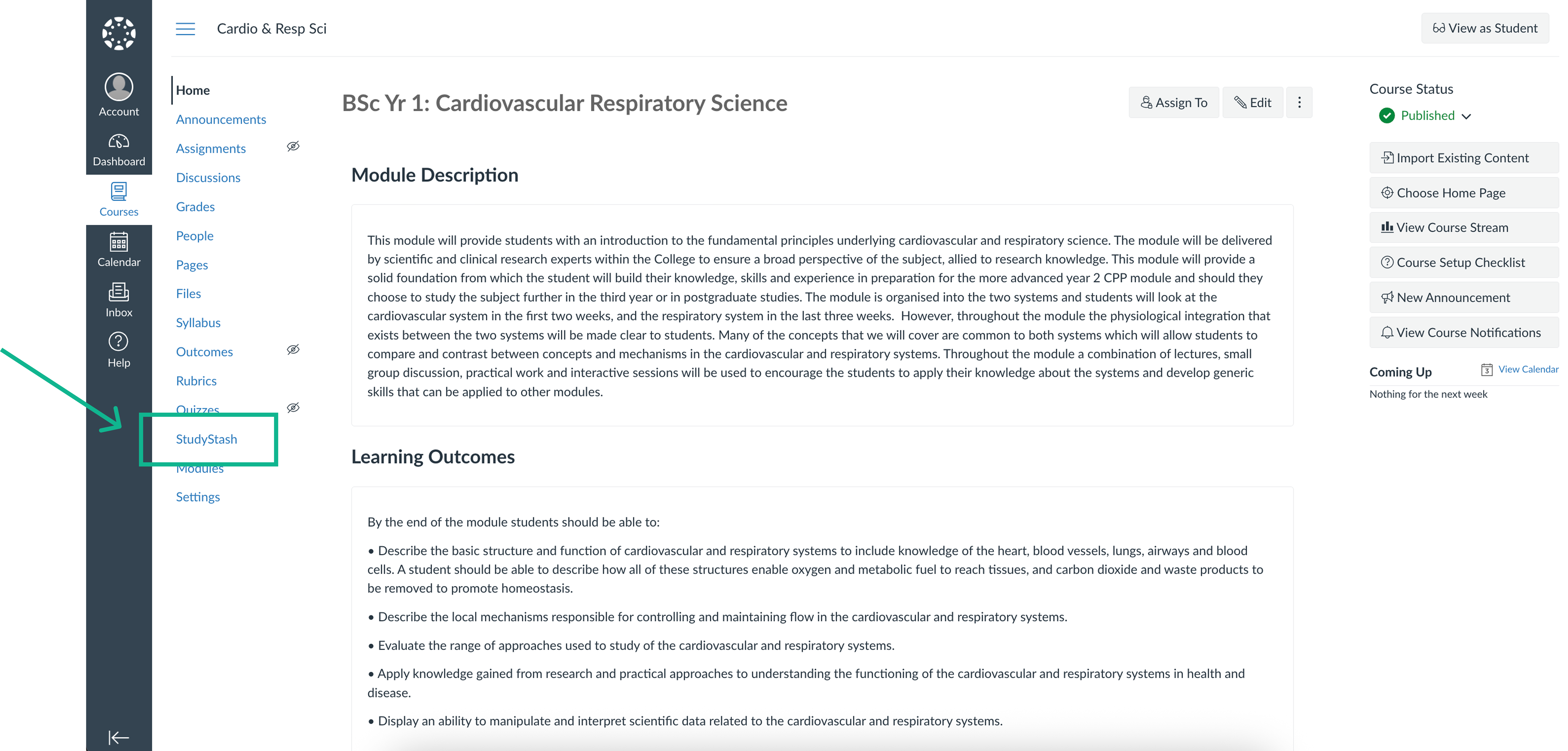
Select StudyStash in the course navigation menu. Other options may differ depending on your role.
Can’t find or open StudyStash?
The StudyStash link is missing
The StudyStash link is missing
Ask your instructor or institution’s IT team to confirm that StudyStash is enabled for this course and where the link is placed.If your institution provides website access, you can also sign in on the StudyStash website.
The link opens, but I can’t sign in
The link opens, but I can’t sign in
Follow the sign-in help guide. If you still need help, contact support with your learning platform, course name and the error message you see.
Nothing happens when I open the link
Nothing happens when I open the link
Check whether your browser has blocked a new window and allow it for your institution’s learning platform. If the page still does not open, contact support with the course name and a screenshot of what happens.